


WhatsApp Account Password — SIM Swapping-இல் இருந்து உங்கள் WhatsApp-ஐ காக்கும் புதிய Feature
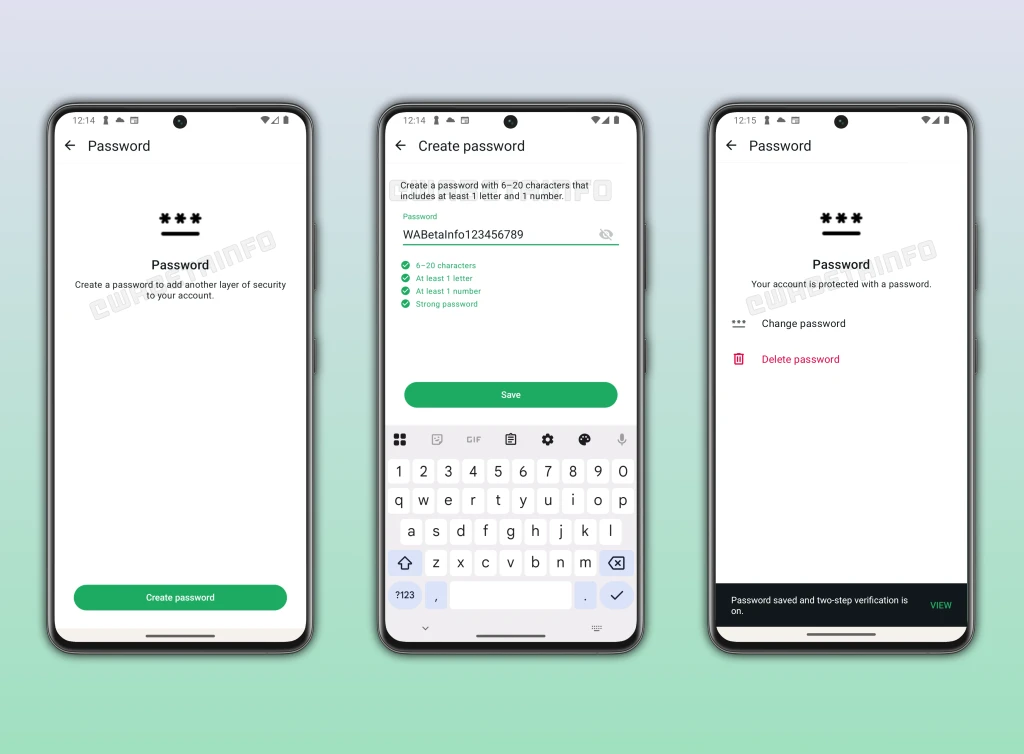
India-ல் மிக வேகமாக அதிகரிக்கும் cyber threats-ல் ஒன்று SIM swapping attack. உங்கள் phone number-ஐ attacker control செய்யும் SIM-க்கு transfer செய்து, உங்கள் WhatsApp, bank accounts, UPI payments-ஐ access செய்வது. WhatsApp இப்போது இதற்கு எதிராக ஒரு powerful security feature develop செய்கிறது: Account Password. Currently beta-ல் உள்ள இந்த feature, SMS verification code-க்கும் 2FA PIN-க்கும் இடையில் ஒரு additional password layer add செய்கிறது. SIM swap attacker verification code intercept செய்தாலும், உங்கள் account password இல்லாமல் WhatsApp access செய்ய முடியாது.
இது ஒரு minor update அல்ல — WhatsApp-ன் authentication architecture-ல் ஒரு fundamental addition. India-ல் WhatsApp users-க்கு crores-ல் financial losses ஏற்படுத்தும் specific attack vector-ஐ address செய்கிறது. என்ன இந்த feature, எப்படி works, ஏன் enable செய்ய வேண்டும் — complete-ஆக பார்ப்போம்.
Account Password என்றால் என்ன?
WhatsApp-ல் நீங்கள் set செய்யும் 6-20 character password:
- Minimum 6, maximum 20 characters
- குறைந்தது ஒரு letter (a-z அல்லது A-Z) கட்டாயம்
- குறைந்தது ஒரு number (0-9) கட்டாயம்
- Special characters optional-ஆக use செய்யலாம்
இது optional feature — WhatsApp force செய்யாது. ஆனால் enable செய்தால், every new login attempt-ல் mandatory step ஆகிறது. Existing two-step verification-உடன் சேர்ந்து work செய்கிறது, replace செய்யாது.
புதிய Login Flow எப்படி Works?
இப்போதைய WhatsApp login flow:
- Phone number enter செய்யுங்கள்
- SMS verification code receive செய்யுங்கள்
- 2FA PIN enter செய்யுங்கள் (enable செய்திருந்தால்)
- Access granted
Account password enable செய்தால் புதிய flow:
- Phone number enter செய்யுங்கள்
- SMS verification code receive செய்யுங்கள்
- Account password enter செய்யுங்கள் (NEW STEP)
- 2FA PIN enter செய்யுங்கள் (enable செய்திருந்தால்)
- Access granted
இது three-layer authentication system create செய்கிறது: phone-க்கு வரும் ஒன்று (SMS code), நீங்கள் அறிந்த ஒன்று (account password), இன்னொரு நீங்கள் அறிந்த ஒன்று (2FA PIN). Attacker மூன்றையும் compromise செய்ய வேண்டும் — extremely difficult.
India-ல் SIM Swapping ஏன் பெரிய Threat?
SIM swapping என்பது ஒரு social engineering attack: criminal உங்கள் telecom provider-ஐ convince செய்து, உங்கள் phone number-ஐ அவர்கள் control செய்யும் புதிய SIM-க்கு transfer செய்கிறார்கள். உங்கள் number-ல் வரும் எல்லா SMS messages — WhatsApp codes, bank OTPs, UPI verifications — attacker-க்கு போகிறது.
India-ல் இது particularly dangerous:
- Problem-ன் scale: RBI report-படி SIM swap-related fraud complaints 2023-2025 இடையில் 300% increase ஆகியுள்ளன
- Financial integration: WhatsApp UPI payments-உடன் directly linked — compromised WhatsApp account direct financial theft-க்கு lead ஆகும்
- Telecom vulnerabilities: Aadhaar verification இருந்தாலும், சில telecom retail outlets fraudulent documents-உடன் SIM swaps process செய்கின்றன
- Target demographic: Non-tech-savvy users — parents, grandparents, small business owners — most vulnerable, least likely to have 2FA enabled
Typical SIM swap attack targeting WhatsApp:
- Attacker உங்கள் phone number obtain செய்கிறார் (data leaks, social media-இல் இருந்து)
- Telecom provider-ஐ social-engineer செய்து replacement SIM வாங்குகிறார்
- உங்கள் SIM deactivate ஆகிறது; attacker-ன் SIM activate ஆகிறது
- WhatsApp setup செய்கிறார், SMS code receive செய்கிறார்
- உங்கள் WhatsApp access — messages, contacts, linked financial services
Account password step 4-ல் இதை block செய்கிறது: verification code இருந்தாலும், password இல்லாமல் proceed செய்ய முடியாது.
2FA vs Account Password vs Passkeys — Comparison
| Feature | என்ன? | எப்போது தேவை? | எதிலிருந்து காக்கிறது? |
|---|---|---|---|
| Two-Step Verification | 6-digit PIN | Phone number re-register செய்யும்போது | Unauthorized re-registration |
| Account Password (NEW) | 6-20 char password | Every new login-ல் SMS code-க்கு பிறகு | SIM swap attacks — SMS code intercept ஆனாலும் protection |
| Passkeys | Biometric (fingerprint/face) | Encrypted backups access செய்யும்போது | Backup data unauthorized access |
மூன்றும் different things-ஐ different points-ல் protect செய்கின்றன. Account password specifically login authentication flow-ஐ target செய்கிறது — SIM swapping-ல் most exploited gap.
Account Password எப்படி Setup செய்வது?
Feature currently beta-ல். Stable rollout வரும்போது:
- WhatsApp → Settings → Account → Security
- "Account Password" tap செய்யுங்கள்
- Password create செய்யுங்கள்: 6-20 characters, குறைந்தது ஒரு letter + ஒரு number
- Password confirm செய்யுங்கள்
- Recovery email set செய்யுங்கள் (password மறந்தால் reset செய்ய)
- Done — இனி எல்லா future login attempts-லும் password required
Strong Password Create செய்ய Tips
- உங்கள் name, birthday, phone number use செய்யாதீர்கள்
- Unique password use செய்யுங்கள் — email அல்லது banking password reuse செய்யாதீர்கள்
- Uppercase, lowercase, numbers, symbols mix செய்யுங்கள்: "Tamizh@2026secure"
- Password manager (Bitwarden, 1Password) use செய்யுங்கள்
- Recovery email definitely set செய்யுங்கள்
Attack Scenarios: Account Password எப்படி Protect செய்கிறது
Scenario 1: SIM Swap Attack
Account password இல்லாமல்: SIM swap → SMS code attacker-க்கு → 2FA PIN guess/phish → full access.
Account password-உடன்: SIM swap → SMS code attacker-க்கு → BLOCKED: account password தெரியாது → attack fail.
Scenario 2: Phone திருட்டு
Account password இல்லாமல்: SIM வேறு device-ல் insert → SMS code → potential access.
Account password-உடன்: SIM insert → SMS code → BLOCKED: password unknown → data safe.
Scenario 3: Telecom Insider Threat
Account password இல்லாமல்: Corrupt employee duplicate SIM issue → codes receive → access.
Account password-உடன்: Duplicate SIM → codes → BLOCKED: password unknown → attack fail.
Limitations என்ன?
- Phishing risk: Fake WhatsApp page-ல் password enter செய்தால் bypass ஆகும்
- Device malware: Phone-ல் malware password capture செய்தால் protection nullify ஆகும்
- Recovery email compromise: Recovery email hack ஆனால் password reset செய்யலாம்
- Optional feature: Most vulnerable users enable செய்யாமல் இருக்கலாம்
Passkeys: தனியாக புரிந்துகொள்ள வேண்டியது
WhatsApp passkeys account password-இல் இருந்து completely separate. Passkeys device biometric authentication (fingerprint, face unlock) பயன்படுத்தி encrypted chat backups-ஐ protect செய்கிறது. Login flow protect செய்யாது — stored backup data protect செய்கிறது. இரண்டும் சேர்ந்து comprehensive protection: account password login-ஐ secure செய்கிறது, passkeys backups-ஐ secure செய்கிறது.
இப்போதே Enable செய்ய வேண்டிய WhatsApp Security Features
Account password rollout ஆகும் வரை இவற்றை enable செய்யுங்கள்:
- Two-Step Verification: Settings → Account → Two-step verification → Enable
- Login Notifications: Settings → Account → Security → Show security notifications
- Disappearing Messages: Sensitive conversations-க்கு auto-delete enable
- Chat Lock: Specific chats-ஐ fingerprint/face ID-உடன் lock
- Silence Unknown Callers: Settings → Privacy → Calls → Silence unknown callers
India-Specific பாதுகாப்பு Advice
- Aadhaar-linked number-ஐ telecom provider app-ல் register செய்யுங்கள் — SIM reissue request alert வரும்
- SIM card-ல் SIM lock (PIN) enable செய்யுங்கள் — physically remove செய்தாலும் use செய்ய முடியாது
- SIM swap attempts-ஐ immediately report செய்யுங்கள்: telecom fraud line + cybercrime.gov.in
- Banking 2FA-க்கு SMS-க்கு பதிலாக authenticator apps use செய்யுங்கள்
Enable செய்ய வேண்டுமா? Yes — எல்லாருக்கும்
Account password virtually no downside உள்ள security feature. New device setup செய்யும்போது (rarely நடக்கும்) ஒரு extra step add ஆகும் — அதற்கு பதிலாக WhatsApp accounts-க்கு எதிரான most common attack vector block ஆகிறது. Inconvenience minimal; protection substantial.
Available ஆன நாளே enable செய்யுங்கள். Family-க்கு சொல்லுங்கள். Parents-க்கு setup செய்து கொடுங்கள். 50 crore-க்கும் மேலான Indians-க்கு primary communication platform-ஆகவும், financial services-உடன் increasingly linked-ஆகவும் இருக்கும் WhatsApp-ல், இந்த feature crores of rupees fraud losses prevent செய்யலாம்.
முடிவு
WhatsApp-ன் account password feature SIM swapping epidemic-க்கு well-designed, targeted response. SMS verification-க்கும் 2FA-க்கும் இடையில் knowledge-based authentication factor add செய்வதன் மூலம், WhatsApp security chain-ன் most exploited gap close ஆகிறது. Two-step verification + account password + passkeys — மூன்று independent layers of protection. Feature currently beta-ல் உள்ளது, wider rollout soon expected. வரும்போது immediately enable செய்யுங்கள் — SIM swap-க்கு எதிராக உங்கள் account-ஐ காக்கும் critical protection.

கருத்துகள் (0)
Be the first to comment!