


WhatsApp Adds Account Passwords — How This New Feature Protects You Against SIM Swapping
WhatsApp is rolling out a new security feature that could significantly reduce one of India's fastest-growing cyber threats: SIM swapping attacks. The feature, currently in beta, introduces an account password — a separate credential that sits between your phone number verification and your existing two-step verification PIN. Even if an attacker manages to hijack your phone number through a SIM swap, they'll hit a wall: your account password.
This isn't a minor UI tweak. It's a fundamental addition to WhatsApp's authentication architecture that addresses a specific, devastating attack vector that has cost Indian users crores in financial losses. Let's break down exactly what this feature is, how it works, and why every WhatsApp user in India should enable it the moment it becomes available.
What Is the WhatsApp Account Password?
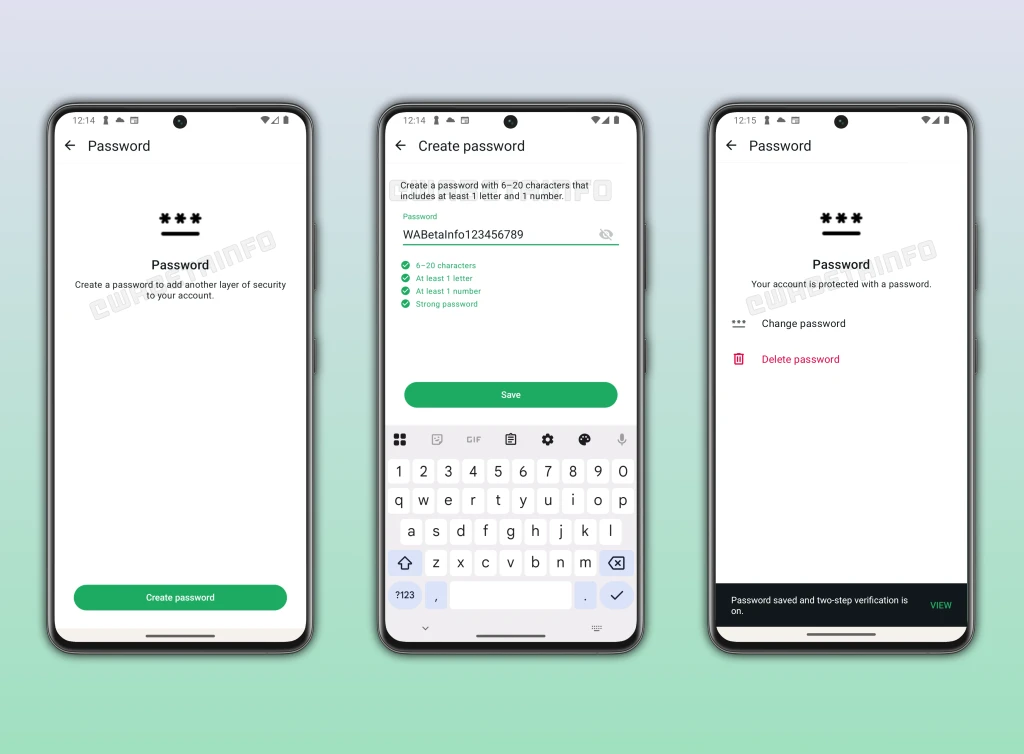
The account password is a 6-20 character password that you set within WhatsApp. Requirements:
- Minimum 6 characters, maximum 20 characters
- Must include at least one letter (a-z or A-Z)
- Must include at least one number (0-9)
- Optional: special characters allowed for additional strength
This password is optional — WhatsApp won't force you to set one. But once enabled, it becomes a mandatory step during any new login attempt. The feature works alongside existing two-step verification, not as a replacement.
How the New Login Flow Works
Currently, when you set up WhatsApp on a new phone, the login flow is:
- Enter phone number
- Receive SMS verification code
- Enter 2FA PIN (if enabled)
- Access granted
With the account password enabled, the new flow becomes:
- Enter phone number
- Receive SMS verification code
- Enter account password (NEW STEP)
- Enter 2FA PIN (if enabled)
- Access granted
This creates a three-layer authentication system: something sent to your phone (SMS code), something you know (account password), and another thing you know (2FA PIN). An attacker would need to compromise all three to gain access.
Why SIM Swapping Is a Growing Threat in India
SIM swapping is a social engineering attack where a criminal convinces your telecom provider to transfer your phone number to a new SIM card they control. Once they have your number, they receive all your SMS messages — including verification codes from WhatsApp, banks, and other services.
The Indian context makes this particularly dangerous:
- Scale of the problem: RBI reported a 300% increase in SIM swap-related fraud complaints between 2023 and 2025
- Financial integration: WhatsApp is directly linked to UPI payments for hundreds of millions of Indians. A compromised WhatsApp account can lead to direct financial theft
- Telecom vulnerabilities: Despite Aadhaar-based verification, some telecom retail outlets have been found to process SIM swaps with fraudulent documents
- Target demographic: Non-tech-savvy users — parents, grandparents, small business owners — are the most vulnerable and least likely to have 2FA enabled
In a typical SIM swap attack targeting WhatsApp:
- Attacker obtains your phone number (from data leaks, social media, or simply knowing you)
- Attacker social-engineers your telecom provider into issuing a replacement SIM
- Your SIM deactivates; attacker's SIM activates with your number
- Attacker sets up WhatsApp, receives SMS verification code on the swapped SIM
- Attacker accesses your WhatsApp — reads messages, contacts, and potentially linked financial services
The account password blocks this attack at step 4: even with the verification code, the attacker cannot proceed without knowing your password.
Account Password vs Two-Step Verification vs Passkeys
WhatsApp now has (or will have) three separate security features. Understanding the difference is critical:
| Feature | What It Is | When It's Needed | What It Protects Against |
|---|---|---|---|
| Two-Step Verification (2FA PIN) | 6-digit PIN set in WhatsApp | When re-registering phone number on any device | Unauthorized re-registration after you lose access |
| Account Password (NEW) | 6-20 char password (letters + numbers) | Every new login attempt after SMS verification | SIM swap attacks — blocks access even with intercepted SMS code |
| Passkeys | Biometric auth (fingerprint/face/screen lock) | Accessing encrypted backups | Unauthorized access to chat backup data |
These three features protect different things at different points. The account password specifically targets the login authentication flow — the most common attack vector in SIM swapping.
How to Set Up the Account Password (When Available)
The feature is currently in WhatsApp beta. When it rolls out to stable, here's how to enable it:
- Open WhatsApp → Settings → Account → Security
- Tap "Account Password" (new option)
- Create a password: 6-20 characters, at least one letter and one number
- Confirm the password
- Optionally set a recovery email in case you forget the password
- Done — password is now required for all future login attempts
Tips for Creating a Strong Account Password
- Don't use your name, birthday, or phone number — attackers target WhatsApp users they know something about
- Use a unique password — don't reuse your email or banking password
- Mix uppercase, lowercase, numbers, and symbols: "Tamizh@2026secure" is much stronger than "password123"
- Use a password manager (Bitwarden, 1Password) if you struggle to remember unique passwords
- Set up the recovery email — if you forget the password, this is your lifeline
How This Protects You: Attack Scenarios
Scenario 1: SIM Swap Attack (Most Common)
Without account password: Attacker gets your SIM swapped → receives SMS code → enters 2FA PIN (if they've shoulder-surfed or phished it) → full access.
With account password: Attacker gets your SIM swapped → receives SMS code → BLOCKED: cannot enter account password → attack fails.
Scenario 2: Lost or Stolen Phone
Without account password: Thief inserts your SIM in another device → receives SMS code → potential access.
With account password: Thief inserts your SIM → receives SMS code → BLOCKED: cannot enter account password → your data is safe.
Scenario 3: Telecom Insider Threat
Without account password: Corrupt telecom employee issues duplicate SIM → attacker receives codes → access.
With account password: Duplicate SIM issued → codes received → BLOCKED: account password unknown → attack fails.
Limitations of the Feature
While the account password significantly improves security, it's not bulletproof:
- Phishing risk: If an attacker tricks you into entering your account password on a fake WhatsApp page, the feature is bypassed
- Device compromise: If malware on your phone captures the password as you type it, the protection is nullified
- Password recovery: If you use the recovery email and that email is compromised, attackers could reset your account password
- Not mandatory: The feature is optional — the most vulnerable users (who need it most) may never enable it
Passkeys: A Separate Feature Worth Understanding
WhatsApp's passkeys feature is completely separate from the account password. Passkeys use your device's biometric authentication (fingerprint, face unlock, or screen lock) to secure access to your encrypted chat backups. They don't protect the login flow — they protect your stored backup data. Both features together provide comprehensive protection: account password secures login, passkeys secure backups.
Other WhatsApp Security Features You Should Enable Now
While waiting for the account password feature to roll out, ensure you have these enabled:
- Two-Step Verification: Settings → Account → Two-step verification → Enable (set a 6-digit PIN)
- Login Notifications: Settings → Account → Security → Show security notifications (alerts when your security code changes)
- Disappearing Messages: For sensitive conversations, enable auto-delete
- Chat Lock: Lock specific chats with fingerprint/face ID
- Silence Unknown Callers: Settings → Privacy → Calls → Silence unknown callers
India-Specific Advice
Given India's unique threat landscape:
- Register your Aadhaar-linked number with telecom provider's app — many providers now alert you via app when a SIM reissue request is made
- Enable SIM lock (PIN) on your SIM card — prevents use if your SIM is physically removed
- Report SIM swap attempts immediately: Call your telecom provider's fraud line and file a complaint at cybercrime.gov.in
- De-link phone number from sensitive accounts where possible — use authenticator apps instead of SMS for banking 2FA
Should You Enable It? Yes — For Everyone
The account password is one of those rare security features with virtually no downside for the average user. It adds one extra step during login (which you do rarely — only when setting up a new device) in exchange for blocking the most common attack vector against WhatsApp accounts. The inconvenience is minimal; the protection is substantial.
Enable it the day it becomes available. Tell your family to enable it. Help your parents set it up. In a country where WhatsApp is the primary communication platform for over 500 million people and is increasingly linked to financial services, this feature could prevent crores of rupees in fraud losses.
Conclusion
WhatsApp's account password feature is a well-designed, targeted response to the SIM swapping epidemic. By adding a knowledge-based authentication factor between SMS verification and 2FA, it closes the most exploited gap in WhatsApp's security chain. Combined with two-step verification and passkeys, WhatsApp users now have (or will soon have) three independent layers of protection. The feature is currently in beta with a wider rollout expected soon. When it arrives, enable it immediately — it could be the difference between keeping your account safe and losing everything to a SIM swap.

Comments (0)
Be the first to comment!