


WhatsApp Beta 2.26.6.4 for Android: New "You" Tab, Cover Photo, 14 App Icons, 19 Accent Colors
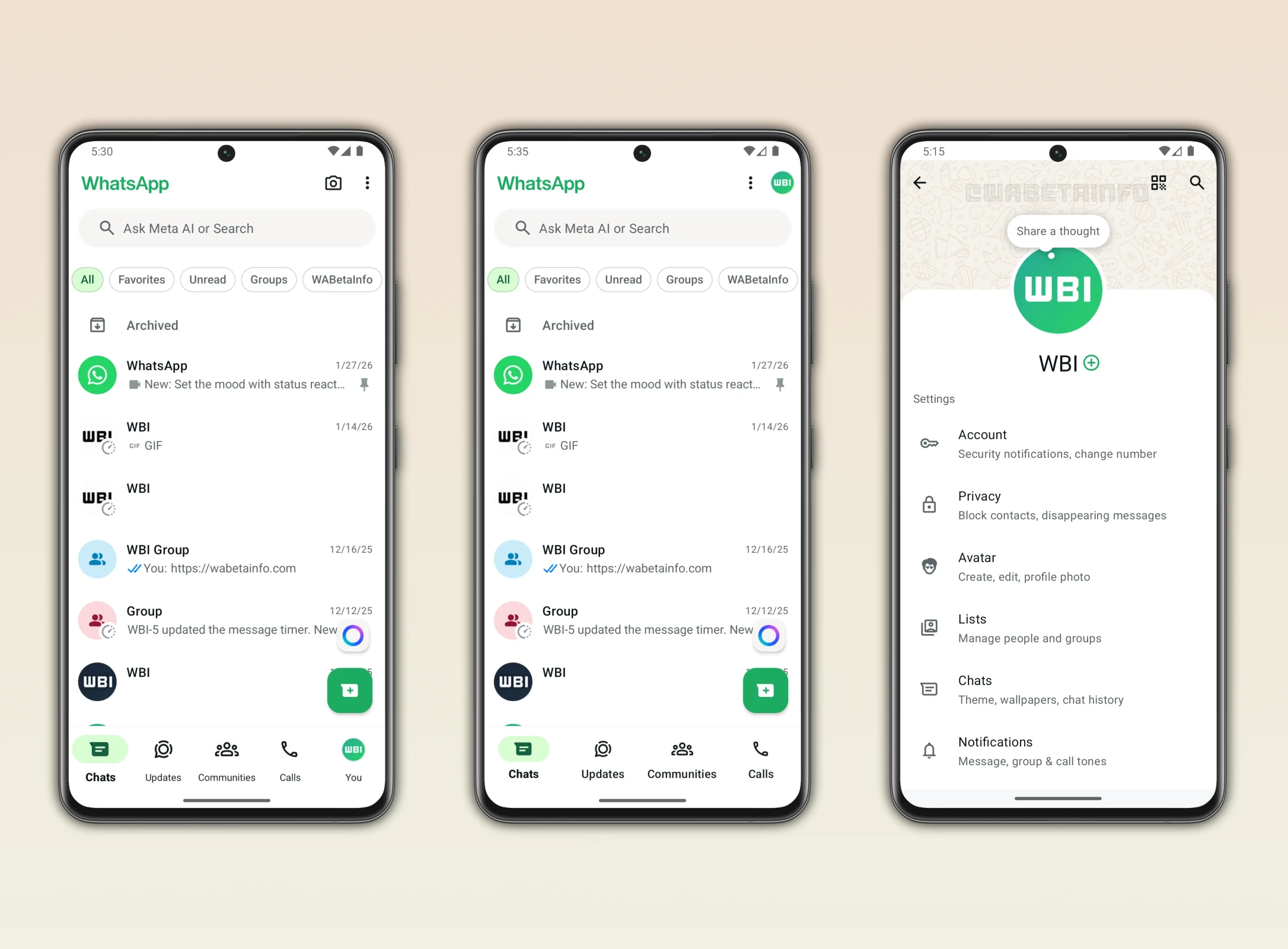
WhatsApp has released Beta version 2.26.6.4 for Android on February 11, 2026, through the Google Play Beta Program. This update introduces several significant changes to the app's user interface and customization options, including a brand-new "You" tab in the navigation bar, a Cover Photo feature for profiles, 14 new premium app icons, and 19 accent color choices. The information comes from WABetaInfo, the authoritative source for WhatsApp beta tracking.
These changes represent WhatsApp's most significant visual refresh in recent memory. While WhatsApp has historically maintained a minimalist, function-first design approach, these updates signal a strategic shift toward personalization and visual expression — features that competitors like Telegram have offered for years.
For India, where WhatsApp has over 500 million users (making it the platform's largest single market globally), these changes will directly impact how hundreds of millions of people interact with their most-used messaging app every day.
Feature 1: The New "You" Tab
The most structurally significant change in WhatsApp Beta 2.26.6.4 is the addition of a "You" tab as the fifth tab in the bottom navigation bar. This is not just a cosmetic change — it fundamentally alters how users navigate the app.
What the "You" Tab Contains
The "You" tab features the user's own profile icon and provides direct access to:
- Profile Settings — Edit your name, about text, and profile photo without navigating through menus
- Privacy Options — Quick access to last seen, profile photo visibility, status privacy, and read receipts settings
- Account Details — Phone number, two-step verification, linked devices, and account security options
- Storage and Data — Manage storage usage, network usage, and media auto-download settings
Why This Change Matters
Previously, accessing profile settings required tapping the three-dot overflow menu in the top-right corner, then navigating through a hierarchical menu system. This was particularly inconvenient on large phones where reaching the top-right corner requires stretching or using two hands. The "You" tab places these frequently-accessed settings at the bottom of the screen, within easy thumb reach.
The current bottom navigation bar in WhatsApp has four tabs: Chats, Updates (formerly Status), Communities, and Calls. The "You" tab becomes the fifth, appearing at the far right. This follows a design pattern established by Instagram, Twitter/X, and other major social platforms that place user profile access in the bottom navigation.
Navigation Before vs After
| Action | Before (Current) | After (With "You" Tab) |
|---|---|---|
| Access Profile Settings | 3-dot menu → Settings → Profile | Tap "You" tab |
| Change Privacy Settings | 3-dot menu → Settings → Privacy | "You" tab → Privacy |
| View Linked Devices | 3-dot menu → Linked Devices | "You" tab → Linked Devices |
| Manage Storage | 3-dot menu → Settings → Storage | "You" tab → Storage |
This reduces navigation from 2-3 taps to just 1-2 taps for most settings, which is a meaningful usability improvement for an app that over 2 billion people use daily.
Feature 2: Cover Photo for Profiles
WhatsApp Beta 2.26.6.4 introduces a Cover Photo feature that adds a visual banner area at the top of user profiles, similar to Facebook's cover photo concept.
How It Works
- A new rectangular banner area appears above the user's name on their profile page
- Users can upload a wider visual element (landscape-oriented image) as their cover photo
- The cover photo is separate from the circular profile photo, which remains in its current position
- Cover photos are visible to anyone who can view your profile (subject to privacy settings)
Practical Use Cases
The Cover Photo feature has several practical applications:
- Personal Expression: Users can showcase favorite photos, artwork, or scenic images as a visual backdrop to their profile
- Business Branding: WhatsApp Business users can display their business banner, logo collage, or product showcase
- Account Identification: When managing multiple WhatsApp accounts (dual SIM), distinct cover photos help quickly identify which account is active
- Event Promotion: Small businesses and community organizers can use the cover photo to promote events, sales, or announcements
India Context for Cover Photos
In India, WhatsApp Business is used by an estimated 15 million+ small and medium enterprises. The cover photo feature gives these businesses a more professional-looking profile, similar to what they might have on a Facebook Business Page. For a street food vendor in Chennai or a textile shop in Surat, a cover photo showing their best products could drive more customer engagement through WhatsApp.
Feature 3: Premium App Icons (14 New Options)
Starting from WhatsApp Beta version 2.26.6.1, WhatsApp introduced 14 new app icons as part of the premium subscription features. These icons are divided into two categories:
7 Single-Color Variants
| # | Icon Color | Style Description |
|---|---|---|
| 1 | Brown | Warm earth tone, subtle and professional |
| 2 | Purple | Rich violet, modern and trendy |
| 3 | Orange | Vibrant and energetic |
| 4 | Green | Alternative shade to default WhatsApp green |
| 5 | Blue | Cool and professional |
| 6 | Pink | Soft and distinctive |
| 7 | Monochrome | Black and white, minimalist design |
7 Special Style Variants
| # | Icon Style | Visual Description |
|---|---|---|
| 1 | Galaxy | Space-themed gradient with stars |
| 2 | Neon | Glowing neon effect on dark background |
| 3 | Aurora | Northern lights color gradient |
| 4 | Fluffy | Soft, cloud-like 3D texture |
| 5 | Clay | Matte clay-like 3D rendering |
| 6 | Sparkle | Glitter and shimmer effect |
| 7 | Default Premium | Enhanced version of standard WhatsApp icon |
These icons replace the WhatsApp icon on the user's home screen, providing visual personalization at the most fundamental level — the app launcher.
Feature 4: 19 Accent Color Options
WhatsApp Premium now offers 19 accent color choices that change the visual theme throughout the app. The available colors are:
- Default Green (the classic WhatsApp green)
- Royal Blue
- Violet
- Navy Blue
- Light Purple
- Dark Grey
- Coral
- Dark Olive Green
- Teal
- Burgundy
- Brown
- Beige
- Seafoam Green
- Yellow
- Olive Green
- Pink
- Red
- Orange
- Golden Yellow
What Changes with Accent Colors
The selected accent color affects multiple UI elements throughout the app:
- Tab indicators — The active tab highlight color in the bottom navigation
- Message filters — The colored chips for filtering chats (All, Unread, Favorites, Groups)
- Floating action button — The new chat/call button in the bottom-right corner
- Links and interactive elements — Hyperlinks and tappable elements within chats
- Status rings — The colored ring around profile photos indicating new status updates
WhatsApp Premium: Pricing Expectations for India
The icon and accent color customization features are part of WhatsApp's optional premium subscription. While global pricing varies, here is what Indian users can expect:
| Plan | Expected India Price | Features Included |
|---|---|---|
| Monthly | Rs 49 - Rs 99/month | All premium icons, all accent colors, cover photo |
| Annual | Rs 499 - Rs 899/year | Same features, discounted annual rate |
For comparison, Telegram Premium costs Rs 179/month in India. WhatsApp's pricing is expected to be competitive, especially given the platform's massive user base that provides pricing leverage.
How to Join WhatsApp Beta on Android
To access these features before they reach the stable release, you need to join the WhatsApp Beta program:
Step-by-Step Guide
- Open Google Play Store on your Android phone
- Search for "WhatsApp" in the search bar
- Scroll down on the WhatsApp Messenger page to find the "Join the beta" section
- Tap "Join" and accept the beta program terms
- Wait for the beta update — it may take a few minutes to several hours for the beta version to become available
- Update WhatsApp once the beta version appears in your app updates
Important Notes about Beta
- Beta slots are limited — if the program is full, you will see a "Beta program is full" message
- Beta versions may contain bugs and stability issues
- You can leave the beta program at any time by scrolling to the same section and tapping "Leave"
- Leaving the beta reverts you to the last stable release
WhatsApp in India: Context and Impact
Understanding these features requires understanding WhatsApp's unique position in India:
- 500M+ users — India is WhatsApp's largest market globally, representing approximately 25% of all WhatsApp users worldwide
- WhatsApp Pay (UPI) — WhatsApp's UPI-based payment system is growing rapidly, with NPCI approving expansion to 100 million users in 2025
- WhatsApp Business — An estimated 15M+ Indian businesses use WhatsApp Business for customer communication, orders, and support
- Telecom Partnerships — Jio, Airtel, and Vi offer WhatsApp-specific data plans, acknowledging its critical role in Indian daily communication
- Telegram Competition — Telegram has 150M+ users in India and offers extensive customization. WhatsApp's new personalization features directly address this competitive gap
Customization Culture in India
Indian smartphone users are among the most customization-oriented in the world. Third-party launcher apps, icon packs, and theme engines are extremely popular. WhatsApp's new icon and accent color features tap directly into this cultural preference. The ability to change WhatsApp's iconic green icon to purple, neon, or galaxy themes will resonate strongly with younger Indian users who prioritize visual personalization.
Comparison: WhatsApp Premium vs Telegram Premium
| Feature | WhatsApp Premium | Telegram Premium |
|---|---|---|
| Custom App Icons | 14 options (7 + 7) | 7 options |
| Accent Colors | 19 colors | 8 themes |
| Cover Photo | Yes (new) | No |
| Animated Emoji | Limited | Extensive |
| File Size Limit | 2 GB (standard) | 4 GB (premium) |
| Expected India Price | Rs 49-99/month | Rs 179/month |
| User Base (India) | 500M+ | 150M+ |
Privacy and Security Considerations
With new profile features like cover photos and enhanced visual presence, users should review their privacy settings:
- Cover Photo Visibility: Like profile photos, cover photo visibility will likely be controllable (Everyone, My Contacts, Nobody)
- The "You" Tab: Places privacy settings one tap away, making it easier to review and adjust privacy preferences
- End-to-End Encryption: These visual changes do not affect WhatsApp's core encryption — all messages, calls, and media remain end-to-end encrypted
- Data Collection: Premium subscription data (payment info, preferences) is subject to Meta's privacy policy
When Will These Features Reach Stable?
Based on WhatsApp's typical beta-to-stable timeline:
- "You" Tab: Expected in stable release within 4-6 weeks (March 2026)
- Cover Photo: Expected in stable release within 6-8 weeks (March-April 2026)
- Premium Icons and Colors: May roll out gradually by region, India expected among early markets given its user base size
Conclusion
WhatsApp Beta 2.26.6.4 represents a meaningful evolution of the platform's user experience. The "You" tab simplifies navigation, the cover photo adds visual identity, and the premium customization options (14 icons, 19 colors) bring the kind of personalization that users — especially in India — have been requesting for years.
While the premium features require a subscription, the core improvements (the "You" tab and its streamlined navigation) will be available to all users for free. For India's 500 million+ WhatsApp users, these changes will make the app feel more personal, more navigable, and more modern.
Join the beta program today if you want to experience these features before they reach the general public. And if you are a WhatsApp Business user, the cover photo feature alone is worth paying attention to — it could give your business profile a significantly more professional appearance.

Comments (0)
Be the first to comment!