


What’s the buzz?
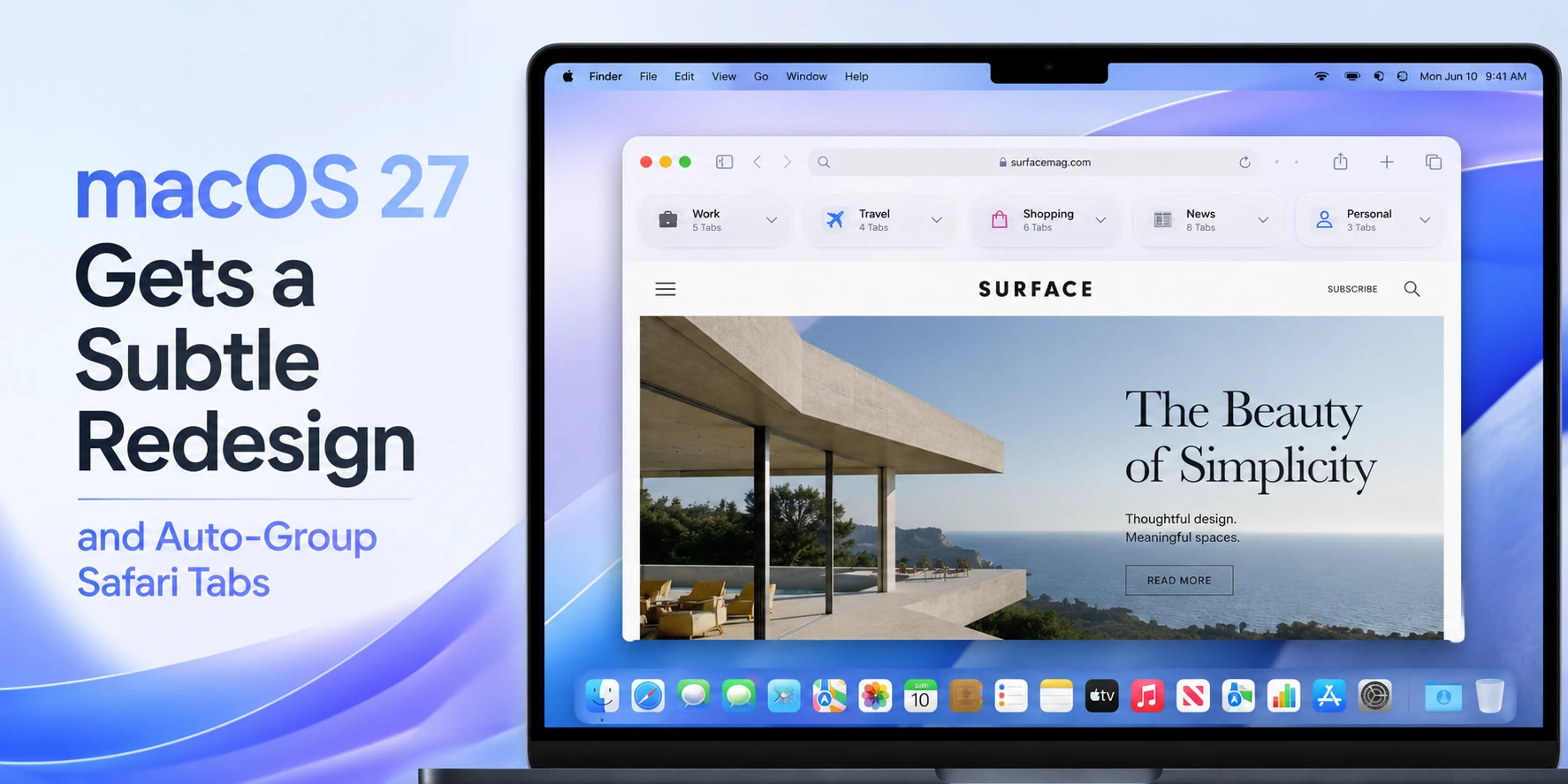
Apple just dropped a hint that macOS 27 will arrive with a "slight redesign" aimed at squashing the dreaded Liquid Glass issue that’s been nagging Mac users for months. On top of that, the next Safari will automatically bundle related tabs into groups – a move that could finally tame the tab‑chaos many of us face.
Liquid Glass – the glitch that got everyone talking
Since the release of macOS Ventura, a subset of users reported a visual artifact that looks like a faint, shimmery layer over the screen. Apple’s engineers called it the "Liquid Glass" bug. It’s not just an eyesore; it can cause UI lag and, in worst‑case scenarios, freeze the system long enough to lose unsaved work.
According to internal testing, the problem stems from the new window‑compositing engine that tries to render transparency effects more efficiently. The fix? A subtle UI overhaul that reduces the reliance on heavy GPU shaders, plus a few under‑the‑hood tweaks to how the OS handles display buffers.
Safari’s auto‑grouping – the feature we didn’t know we needed
Safari has always been a clean browser, but power users in India often end up with 30‑plus tabs when juggling shopping sites, news, and work portals. The upcoming "Auto‑Group" feature will analyze the content of open tabs and cluster them into logical groups – think "Shopping", "Work", "News" – without you lifting a finger.
How does it work? Apple is leveraging on‑device machine learning. When you open a new tab, Safari checks the URL, page title, and even meta‑tags to decide which bucket it belongs to. The groups appear as collapsible sections in the tab bar, and you can rename them or merge groups manually.
Why Indian users should care
Most of us use Macs for a mix of professional work (design, development) and personal browsing (Amazon, Swiggy, Jio services). The Liquid Glass glitch has been a real pain point, especially on 4K Retina displays that many Indian creators own. A smoother visual experience translates to less eye strain during long editing sessions.
Auto‑grouping Safari tabs is a game‑changer for anyone who does heavy research – students comparing college fees, freelancers pulling up multiple client portals, or families planning trips across IRCTC, MakeMyTrip, and airline sites. Fewer clicks, less memory usage, and a tidier tab bar mean better battery life on MacBooks – something every student on a budget will appreciate.
What’s changing in the UI?
- Menu bar icons get a marginally slimmer look, freeing up space for more apps.
- System preferences panels now use a flatter design, reducing the number of layers the GPU has to render.
- Desktop wallpaper rendering is optimized to avoid the shimmering overlay that caused the Liquid Glass effect.
These aren’t radical redesigns like the macOS Big Sur overhaul, but they’re enough to make the OS feel fresher and, more importantly, more stable.
Step‑by‑step: How to enable auto‑grouping (once macOS 27 ships)
1. Open Safari.
2. Click on Safari → Preferences → Tabs.
3. Toggle "Auto‑Group Tabs" ON.
4. Restart Safari to apply.
After that, you’ll see groups appear automatically. You can also drag tabs between groups or right‑click a group to rename it.
Impact on pricing and availability in India
Apple hasn’t announced a price hike for macOS upgrades – the OS is free for eligible Macs. However, the new UI tweaks might push some older Mac models (pre‑2017) out of the support list. If you’re still on a 2015 MacBook Air, you may need to consider a trade‑in or a refurbished 2018‑2020 model, which you can find on the Apple Store India for around ₹70,000‑₹1,00,000.
For students, the Apple Education Store offers up to 10% off on new MacBooks, making the upgrade path more affordable.
TamilTech‑ஓட கருத்து
Honestly, the “slight redesign” sounds like Apple is playing it safe – they’re not overhauling the whole look, just fixing the pain points that matter. The Liquid Glass fix is a relief for creators who can’t afford a system crash during a video render. Auto‑grouping Safari tabs, on the other hand, feels like a subtle but powerful productivity boost. It won’t replace dedicated tab‑management extensions, but it will reduce the clutter for the average user.
One downside: the machine‑learning model runs locally, so older Macs might see a small performance dip while the OS builds the knowledge base. But that’s a one‑time cost.
What’s next?
Apple is expected to announce macOS 27 at WWDC 2026, with a public beta rolling out in June. Keep an eye on the Apple Developer portal for the beta download link. If you’re a power user, we recommend signing up for the beta to test the new Safari grouping on a secondary Mac before the final release.
In short, macOS 27 aims to be a smoother, smarter experience without breaking the bank. For Indian users juggling work, study, and entertainment, those tweaks could make a real difference.




Comments (0)
Be the first to comment!