


முக்கிய விஷயங்கள்
- Regex என்பது magic இல்ல, ஒரு afternoon-ல கத்துக்கிற mini pattern language தான்.
- \d, \w, [A-Z] மாதிரி character classes தான் உங்க input-ல எது valid, எது இல்ல-ன்னு decide பண்ணும்.
- ^ $ anchors position-ஐயும், +, *, {n,m} quantifiers எத்தனை repeat ஆகணும்-ன்னும் control பண்ணும்.
- () groups வெச்சு, match ஆன முழு string வேணாம், உங்களுக்கு தேவையான PAN அல்லது OTP மட்டும் capture பண்ணலாம்.
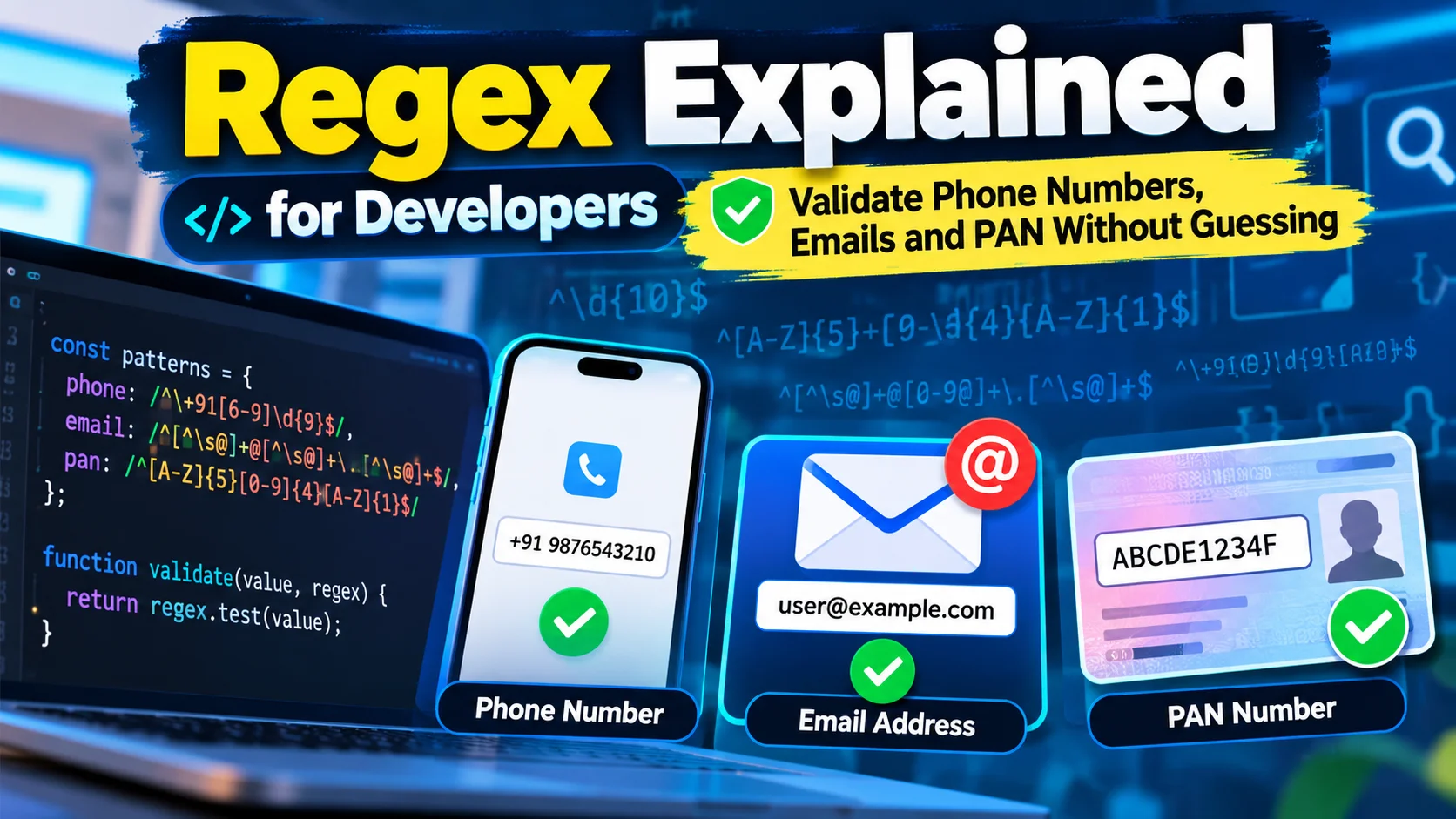
- Mobile number, PAN, PIN code - மூணுக்கும் pattern வேற. Stack Overflow-ல இருந்து blind-ஆ copy paste பண்ண வேண்டாம்.
இது என்ன, ஏன் இப்போ தெரிஞ்சுக்கணும்?
கொஞ்சம் யோசிங்க. கடந்த வாரம் உங்க startup app-க்கு signup form ஒன்னு பில்ட் பண்ணீங்க. ஒருத்தர் rahul@@gmail..com-ன்னு type பண்ணி submit பண்ணிட்டாரு. உங்க backend அதை சந்தோஷமா save பண்ணிடுச்சு. மூணு வாரம் கழிச்சு, உங்க transactional emails எல்லாம் bounce ஆகுது. ஏன்-ன்னு யாருக்கும் தெரியல. இது ஒரு two-person Chennai startup-லயும் நடக்கும், Bangalore-ல ஒரு unicorn company floor-லயும் நடக்கும்.
இதுக்கு fix எது-ன்னா, extra code இல்ல. ஒரு நல்ல regular expression validation layer-ல நிக்குனா போதும், garbage data உங்க database-க்குள்ள போகுறதுக்கு முன்னாடியே அதை பிடிச்சிடும். Regex பாத்தா பயம் வரும் - backslash, bracket எல்லாம் வெச்சு யாரோ keyboard மேல தூங்கி எழுதினமாரி இருக்கும். ஆனா 5-6 building blocks தெரிஞ்சுக்கிட்டா, phone number check, PAN validator, PIN code lookup, log file parser - எதுவா இருந்தாலும் படிச்சுக்கலாம்.
Characters and Classes - இது என்ன basics?
Regex engine உங்க pattern-ஐ character by character படிச்சி, input text-கிட்ட match பண்ணி பார்க்கும். சில characters அப்படியே தங்களையே match பண்ணும். Classes-ன்னு சொல்லப்படுற வேற சில, ஒரு whole category characters-ஐ match பண்ணும்.
அதாவது, \d எந்த digit-ஐயும் match பண்ணும், \w letter, digit, underscore எதையும் match பண்ணும், \s space அல்லது tab-ஐ match பண்ணும். நீங்களே square brackets வெச்சு custom class-ஆ உருவாக்கலாம், உதாரணமா [A-Z] எந்த uppercase letter-ஐயும் match பண்ணும்.
// Character classes in action
const input = "My OTP is 482913";
const digitsOnly = input.match(/\d+/);
console.log(digitsOnly[0]); // 482913
Quantifiers மற்றும் Anchors - position எப்படி control செய்யலாம்?
இப்போ quantifiers மற்றும் anchors பாக்கலாம். இதுதான் decide பண்ணும் - ஒரு character எத்தனை தடவை repeat ஆகணும், அது string-ல எங்க இருக்கணும்-ன்னு.
+ என்றா ஒண்ணு அல்லது அதுக்கு மேல, * என்றா zero அல்லது அதுக்கு மேல, {n,m} என்றா n முதல் m வரைக்கும் repeat. ^ மற்றும் $ anchors string-ன் start, end-ல match-ஐ pin பண்ணும். உங்க input-ல extra space அல்லது hidden characters இருக்கும்போது இது மிகவும் முக்கியம்.
// Quantifiers + anchors - stray text வேண்டாம்
const pattern = /^[6-9]\d{9}$/;
console.log(pattern.test("9876543210")); // true
console.log(pattern.test("98765432100")); // false - 11 digits
console.log(pattern.test("abc9876543210")); // false - anchors block
இந்த pattern-ஐ கவனிச்சு பாருங்க. [6-9] - Indian mobile numbers எப்போவுமே 6, 7, 8, 9-ல தொடங்கும். \d{9} - அப்புறம் exactly 9 digits வேணும், total 10 digit number-ஆ. ^ $ இல்லாம விட்டா, "xyz9876543210abc" மாதிரி junk string-லயும் இந்த pattern match ஆகிடும்.
Groups and Capture - extraction எப்படி பண்றது?
இப்போ groups and capture பாக்கலாம். இதுதான் regex-ஐ yes/no check-ல இருந்து, real extraction tool-ஆ மாத்தும் part. Pattern-ல ஒரு பகுதியை () வெச்சு wrap பண்ணீங்கன்னா, அது ஒரு separate group ஆகும். Match முழுக்க எடுக்காம, அந்த group-ஐ மட்டும் தனியா pull பண்ணலாம்.
// PAN number-ல இருந்து groups-ஐ capture பண்றது
const panRegex = /^([A-Z]{5})([0-9]{4})([A-Z])$/;
const pan = "ABCPK1234L";
const match = pan.match(panRegex);

if (match) {
  console.log("Full PAN:", match[0]); // ABCPK1234L
  console.log("Letters part:", match[1]); // ABCPK
  console.log("Digits part:", match[2]); // 1234
  console.log("Checksum letter:", match[3]); // L
}
இந்த மாதிரி ஒரு PAN number-ல 3 pieces-ஆ பிரிச்சி எடுக்கலாம். Interview-ல இதை கேட்டா, "group index 0 என்றா full match, 1 முதல் என்றா உங்க () order-ல captured groups"-ன்னு சொல்லுங்க, அவங்க சந்தோஷப்படுவாங்க.
இந்தியாவுல / நம்ம Phone-ல என்ன மாறும்?
நம்ம daily product-ல regex எங்க எல்லாம் use ஆகுதுன்னு பாக்கலாம். Mobile number, PAN, PIN code - மூணுக்கும் pattern வேற வேற. ஒண்ணை இன்னொண்ணுக்கு copy paste பண்ணினா bug வரும்.
// மூணு common Indian validators ஒரே இடத்தில்
const mobileRegex = /^[6-9]\d{9}$/;
const panRegex = /^[A-Z]{5}[0-9]{4}[A-Z]$/;
const pinCodeRegex = /^[1-9][0-9]{5}$/;

console.log(mobileRegex.test("9123456789")); // true
console.log(panRegex.test("ABCPK1234L"));    // true
console.log(pinCodeRegex.test("600028"));     // true - Chennai pin code
console.log(pinCodeRegex.test("012345"));     // false - first digit 0 இருக்க முடியாது
PIN code-ல first digit ஒருபோதும் 0-ஆ இருக்காது, அதனால [1-9] வெச்சோம். PAN-ல 10 characters fix - 5 letters, 4 digits, 1 letter, இந்த order மாறாது. Mobile number-ல 6 முதல் 9 வரைக்கும் தொடங்கி, total 10 digits இருக்கணும். இந்த மூணையும் ஒரே pattern-ல போட்டா work ஆகாது, ஒவ்வொண்ணுக்கும் தனி logic வேணும்.
Regex-ல தப்பா பண்ணும் Common Mistakes என்னென்ன?
முதல் mistake - anchors skip பண்றது. ^ $ இல்லாம போனா, உங்க regex string-ல எங்காவது match ஆயிடும், full string validate ஆகாது. "9876543210xyz" கூட pass ஆகிடும்.
இரண்டாவது mistake - greedy quantifiers. .* எல்லாத்தையும் greedy-ஆ எடுத்துக்கும், இதனால email validation-ல "[email protected] extra text" மாதிரி junk-உம் match ஆகும். Specific class, specific length வெச்சுதான் tight-ஆ control பண்ணணும்.
மூணாவது mistake - unicode மற்றும் whitespace ignore பண்றது. User oru mobile number-ல leading space அல்லது zero-width character paste பண்ணிட்டா, trim() இல்லாம நேரடியா regex test பண்ணினா fail ஆகும். Always trim, then test.
நாலாவது - emailக்கு 100% perfect regex-ன்னு ஒண்ணும் இல்ல. RFC standard complex-ஆ இருக்கு. Practical-ஆ ஒரு reasonable pattern வெச்சி, actual verification-க்கு OTP அல்லது confirmation email தான் final truth.
எங்க இதெல்லாம் Interview-ல கேப்பாங்க?
Chennai, Bangalore IT companies-ல backend validation layer-ல regex எல்லா இடத்திலும் இருக்கும் - signup forms, KYC flows, log parsing, data cleaning scripts. Fintech, e-commerce companies PAN, Aadhaar format, UPI VPA format check பண்ண regex use பண்றாங்க. Interview-ல "Indian mobile number validate பண்ணுற regex எழுதுங்க" அல்லது "log file-ல இருந்து IP address extract பண்ணுங்க"-ன்னு கேட்பாங்க. Groups, anchors, greedy vs lazy quantifiers தெரிஞ்சா இதெல்லாம் easy-ஆ answer பண்ணலாம்.
நீங்க இப்போ என்ன பண்ணுங்க?
ஒரு சின்ன practice task. உங்க favorite editor-ல ஒரு regex எழுதுங்க, அது 6-digit Indian PIN code-ஐ மட்டும் validate பண்ணணும், ஆனா அதுல group-ஆ first digit தனியா capture ஆகணும் (அதாவது region code). Test பண்ணுங்க: "600028", "110001", "012345" - மூணும் சரியா result கொடுக்கிறதா பாருங்க.
Regex-ஐ Step-by-Step எப்படி Debug பண்றது?
புதுசா regex எழுதுறப்போ, ஒரே வரியில எல்லாத்தையும் முடிக்க நினைக்காதீங்க. முதல் step - உங்க input format-ஐ தாள்ல எழுதி பாருங்க, எத்தனை characters, எந்த position-ல digit, எந்த position-ல letter-ன்னு. அப்புறம் chunk by chunk pattern கட்டுங்க, ஒவ்வொரு chunk-ஐயும் regex101.com மாதிரி tool-ல போட்டு test பண்ணுங்க. உதாரணமா, Zomato அல்லது Swiggy order ID-ஐ parse பண்றதா இருந்தா, முதல்ல letters மட்டும் தனியா match பண்ணி பாருங்க, அப்புறம் digits சேருங்க, கடைசில anchors போடுங்க. இப்படி படி படியா கட்டினா, எங்க தப்பு இருக்குன்னு உடனே தெரியும், முழு pattern-ஐயும் ஒரே நேரத்தில் debug பண்ண வேண்டிய அவசியம் வராது.
Chennai-ல ஒரு IRCTC ticket booking app build பண்ணுனப்போ, PNR number validate பண்ண வேண்டிய scene வந்தது-ன்னு வைச்சுக்கோங்க. PNR 10 digits-ஆ இருக்கும், ஆனா சில legacy systems-ல leading zero இருக்கும். இந்த மாதிரி edge case-ஐ முதல்ல தெரிஞ்சுக்காம பண்ணினா, production-ல போனப்போ தப்பா reject ஆகும். அதனால real data sample வெச்சு, குறைந்தது 10-15 variations test பண்ணிட்டு தான் pattern-ஐ live-க்கு push பண்ணணும். இது ஒரு one-time வேலை இல்ல, ஒவ்வொரு validator-க்கும் இப்படி சோதிச்சு பாக்கிற habit வேணும்.
இன்னொரு practical tip - production code-ல regex pattern-ஐ ஒரு constant file-ல தனியா வெச்சு, comment-ஆ என்ன format expect பண்றோம்-ன்னு எழுதி வைங்க. ஆறு மாசம் கழிச்சு வேற developer அதை பார்க்கும்போது, backslash பார்த்து பயப்பட வேண்டாம், நேரா புரிஞ்சிக்கலாம். இப்படி சின்ன discipline வெச்சுகிட்டா, team size பெருசா இருந்தாலும் regex maintenance headache ஆகாது.




கருத்துகள் (0)
Be the first to comment!