


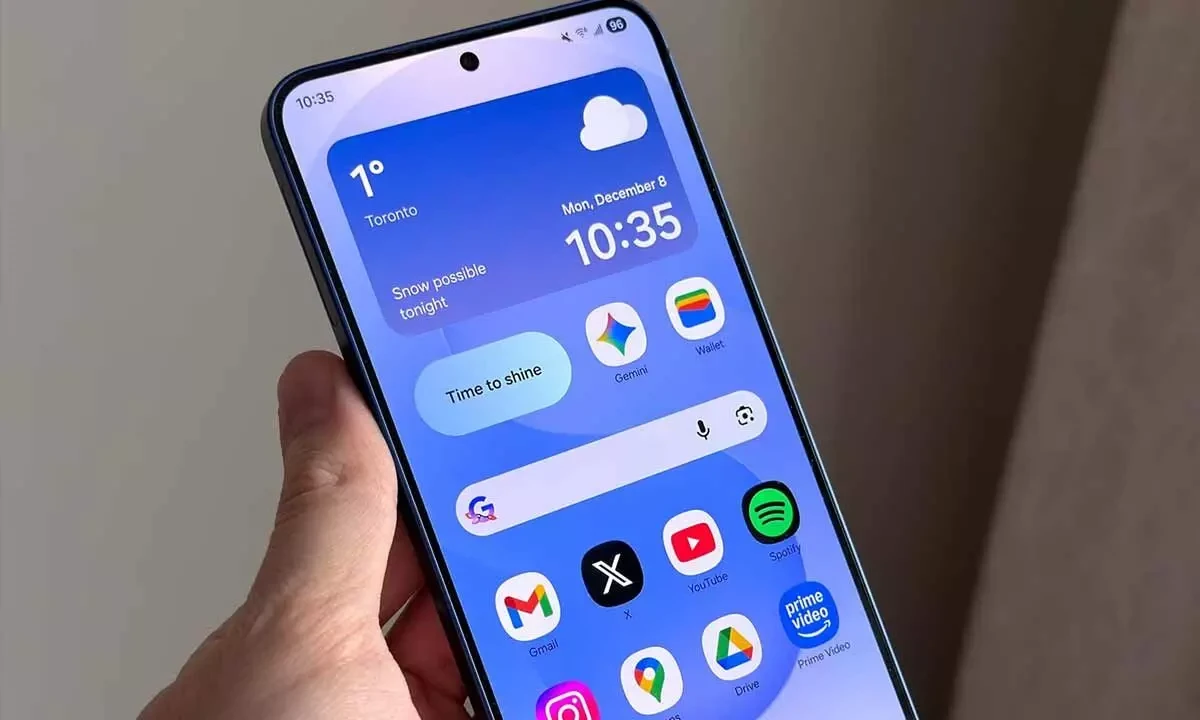
One UI 8.5 Beta 3 India-ல் Release: Samsung-ன் மிகப்பெரிய Software Update பத்தி முழு விவரம்
Samsung officially One UI 8.5 Beta 3-ஐ India-ல் Galaxy S25 series users-க்கு roll out பண்ணிருச்சு. இது Samsung history-லேயே most ambitious One UI update-ன் development-ல் ஒரு முக்கிய milestone. Android 16 base-ல் build ஆன One UI 8.5, Samsung-ன் software experience-ல் complete visual + functional overhaul — Google-ன் Liquid Glass design language, advanced AI features, பல quality-of-life improvements எல்லாம் கொண்டு வருது.
Galaxy S25, Galaxy S25+, அல்லது Galaxy S25 Ultra வச்சிருந்தா, இந்த article உங்களுக்கான complete guide — One UI 8.5 Beta 3 என்னென்ன features கொண்டு வருது, எப்படி install பண்றது, என்ன bugs fix ஆச்சு, வரும் மாதங்கள்ல என்ன expect பண்ணலாம் — எல்லாம் detail-ஆ பார்க்கலாம்.
One UI 8.5 என்ன, ஏன் Important?
One UI 8.5 Samsung-ன் next major software release — One UI 8.0-க்கு successor (அதுவும் Android 16 based-தான்). Simple-ஆ சொல்லணும்னா: One UI 8.0 foundation update — Android 16 core features Samsung devices-க்கு கொண்டு வந்தது. One UI 8.5 feature-packed release — அந்த foundation மேல Samsung-ன் own innovations, design changes, AI integrations build பண்றது.
இது important ஏன்னா One UI 8.5 Galaxy S26 series-உடன் ship ஆகும் — February 25, 2026 Galaxy Unpacked-ல் announce, March 2026-ல் available. Galaxy S26 வாங்கறவங்க எல்லாரும் One UI 8.5 out of the box experience பண்ணுவாங்க. அதுக்கு அப்புறம் Samsung 50+ older devices-க்கு roll out பண்ணும் — Galaxy S24, S23, Z Fold/Flip, Galaxy A-series, tablets எல்லாம் include.
Beta 3 Technical Details
Features-க்கு போறதுக்கு முன்னாடி, Beta 3 build-ன் technical specifics:
| Detail | Specification |
|---|---|
| Firmware Version | ZA3 |
| Download Size | ~1.2 GB |
| Security Patch | January 2026 |
| Base OS | Android 16 |
| Eligible Devices (Beta) | Galaxy S25, Galaxy S25+, Galaxy S25 Ultra |
| India Beta Label | Beta 2 (global numbering-லிருந்து offset) |
| Beta 4 Release | February 9, 2026 |
| Stable Release | March 2026 expected (Galaxy S26-உடன்) |
Indian users-க்கு important note: Samsung-ன் staggered beta rollout schedule-ல் globally Beta 3-ன்னு label ஆனது India-ல் Beta 2-ன்னு காட்டும். India beta program Korea-வும் US-க்கும் ஒரு cycle late-ஆ join ஆச்சு. Features-ம் firmware version (ZA3)-ம் label எதுவா இருந்தாலும் identical-தான்.
Liquid Glass Design: Samsung-ன் Visual Revolution
One UI 8.5-ல் மிகவும் visible change Google-ன் Liquid Glass design language adoption. Google I/O 2025-ல் Material Design-ன் next evolution-ஆ introduce ஆச்சு. Translucent, glass-like UI elements — பின்னால் இருக்கிற content-ஐ refract-ம் reflect-ம் பண்றது. Interface-ல் depth-ம் dimensionality-ம் feel ஆகும்.
Liquid Glass-ல் என்னென்ன மாறுது?
- Quick Settings Panel: Frosted glass tiles-உடன் completely redesigned. Split Quick Panel — notifications left side-லிருந்து pull down, Quick Settings tiles right side-லிருந்து. Stock Android 16 approach-ஐ mirror பண்றது.
- System Icons: Wi-Fi, Bluetooth, battery, signal strength — எல்லா system icons-ம் glassy, semi-transparent aesthetic-ல் redraw ஆச்சு. Device orientation-க்கு respond ஆகிற subtle light reflections.
- Settings App: Full Settings hierarchy Liquid Glass cards, rounded edges, translucent section headers-உடன் redesigned.
- Lock Screen: Glass-effect text-உடன் new clock styles. Wallpaper-உடன் blend ஆகிற blur/refraction effects widgets.
- Samsung Apps: Phone, Messages, Calendar, Gallery, My Files — எல்லா first-party apps-ம் Liquid Glass elements-உடன் updated.
User Reception: Divisive Opinions
| Positive Feedback | Negative Feedback |
|---|---|
| Modern-ம் premium-ஆவும் தெரியுது | Bright sunlight-ல் readability குறையுது |
| Smooth animations-ம் transitions-ம் | Older devices-ல் GPU load, battery affect |
| Apps-ல் consistent design language | Transparency effects distracting ஆகலாம் |
| Dynamic blur effects sophisticated-ஆ இருக்கு | iOS-ஐ resemble பண்றதா சிலர் சொல்றாங்க |
Traditional look prefer பண்றவங்களுக்கு Samsung Accessibility settings-ல் transparency effects reduce பண்ற option கொடுத்திருக்கு.
AI Features: Intelligence Layer
One UI 8.5 Samsung-ன் most aggressive on-device AI push — Galaxy S24-ல் introduce ஆன Galaxy AI foundation மேல build ஆனது.
Now Nudges
Now Nudges Samsung-ன் proactive AI assistant — நீங்க கேக்காமலேயே contextual suggestions surface பண்றது:
- Current traffic-ம் calendar-ம் based-ஆ meeting-க்கு கிளம்ப remind பண்றது
- Miss ஆன call-ஐ call back பண்ண suggest பண்றது — communication patterns based
- Flight delays alert பண்ணி boarding pass automatically pull up பண்றது
- Lunch time-ல் current location nearby restaurants recommend — past preferences based
Now Nudges Samsung-ன் Now Brief-உடன் integrate ஆகுது — daily AI-generated summary (schedule, weather, commute, news). Beta 3-ல் Now Brief incorrect weather data-வும் missed calendar events-ம் fix ஆச்சு.
Bixby + Perplexity Integration
Samsung Perplexity AI-ஐ Bixby-உடன் integrate பண்ணிருச்சு — real-time web search results AI-powered summaries-உடன் access. Complex, multi-part questions cited sources-உடன் answer பண்ண முடியும் — previously Bixby-ன் biggest weakness Google Assistant-ம் Siri-உம் compare பண்ணும்போது.
Bixby-கிட்ட factual question கேட்டா, Perplexity search engine-ல் route பண்ணி, relevant results retrieve பண்ணி, answer synthesize பண்ணி, source links-உடன் present பண்றது. India-ல் English-ல் available; Tamil language support future update-ல் expect பண்ணலாம்.
Type for Edit: AI Photo Editing
Type for Edit — Samsung Gallery app-ல் new AI photo editing tool. Manually tools select பண்ணி parameters adjust பண்றதுக்கு பதிலா, natural language instruction type பண்ணினா போதும்:
- "Remove the person in the background"
- "Make the sky more blue and dramatic"
- "Change the lighting to golden hour"
- "Remove the watermark from the corner"
AI instruction process பண்ணி edit apply பண்றது. Multiple instructions chain பண்ணலாம், individual steps undo பண்ணலாம். Samsung cloud servers-ல் processing-க்கு data connection தேவை.
Privacy & Security Features
Privacy Display
Privacy Display — screen-ன் viewing angle narrow பண்ற software-based feature. பக்கத்தில் உட்காந்திருக்கிறவங்க உங்க content பார்க்க முடியாது. Hardware privacy screens போல இல்ல — pixel brightness-ம் contrast-ம் extreme viewing angles-ல் adjust பண்றது. Quick Settings-லிருந்து toggle. Indian commuters-க்கு public transport-ல் sensitive messages-ம் banking apps-ம் use பண்றப்போ especially useful.
Direct Voicemail
Direct Voicemail — attend பண்ண முடியாத calls-ஐ on-device AI answer பண்றது, caller message real time-ல் transcribe பண்றது, screen-ல் transcription display பண்றது. Call pick up பண்ணலாம், quick reply அனுப்பலாம், இல்ல voicemail complete ஆக விடலாம். Carrier voicemail support இல்லாமலேயே work ஆகும் — device-ல் locally process. India-ல் English-ல் available, Hindi-ம் Tamil-ம் later update-ல்.
Storage Share
Storage Share — phone storage-ன் ஒரு portion-ஐ another Samsung device-உடன் local network-ல் share பண்ணலாம். Wireless external drive feature — phone-ல் folder designate பண்ணினா, another Samsung device அந்த folder-ஐ access பண்ணி files transfer பண்ணலாம். Internet connectivity தேவையில்ல. USB cable இல்லாம large videos transfer பண்ண useful.
Beta 3-ல் Bug Fixes
| Bug | Beta 3 Status |
|---|---|
| Lock screen clock wrong time display | Fixed |
| Standby-ல் excessive battery drain | Improved (fully resolve ஆகல) |
| Large libraries-ல் Gallery app lag | Fixed |
| Now Brief incorrect weather information | Fixed |
| Phone app favorites section crash | Fixed |
| Galaxy S25 (non-Ultra)-ல் Liquid Glass animation stutter | Improved |
| Split Quick Panel occasionally unresponsive | Fixed |
Beta 4 February 9, 2026-ல் release ஆச்சு — remaining battery drain issues address பண்ணி Liquid Glass animations further polish பண்ணும்-ன்னு expect பண்ணலாம்.
India-ல் One UI 8.5 Beta Enroll பண்றது எப்படி?
Step-by-Step Guide
- Requirements: Galaxy S25 series device + active Indian SIM card. Latest stable One UI version run ஆகணும். Carrier-locked இருக்க கூடாது.
- Samsung Members App Open: Samsung Members app launch பண்ணுங்க. இல்லைன்னா Galaxy Store-லிருந்து download பண்ணுங்க.
- Beta Registration Navigate: Samsung Members home screen-ல் One UI Beta Program banner தேடுங்க. இல்ல "Notices" section-ல் beta enrollment announcement check பண்ணுங்க.
- Register: Registration banner tap பண்ணி on-screen instructions follow. Samsung beta program terms agree பண்ணணும்.
- Update Check: Registration-க்கு அப்புறம் (few minutes to hours ஆகலாம்), Settings → Software Update → Download and Install. Beta update appear ஆகும்.
- Download & Install: ~1.2 GB download. Wi-Fi use பண்ணுங்க, battery 50%-க்கு மேல இருக்கணும்.
Important Warnings
- Beta software unstable ஆக இருக்கலாம். Occasional crashes, battery drain, app compatibility issues expect பண்ணுங்க. Critical tasks-க்கு depend பண்ற primary device-ல் install பண்ணாதீங்க.
- Data backup பண்ணுங்க — Samsung Cloud அல்லது Smart Switch-ல் full backup.
- Beta-லிருந்து stable-க்கு roll back பண்ணா full factory reset தேவை — எல்லா data erase ஆகும்.
- Banking apps (GPay, PhonePe, Paytm) beta firmware-ல் SafetyNet/Play Integrity issues-னால correctly work ஆகாம போகலாம்.
One UI 8.5 Stable Release Timeline
| Milestone | Date | Details |
|---|---|---|
| Galaxy S26 Announcement | February 25, 2026 | Galaxy Unpacked; One UI 8.5 showcase |
| Galaxy S26 Availability | March 2026 | One UI 8.5 stable-உடன் ship |
| Galaxy S25 Series | March-April 2026 | முதல் older devices stable update |
| Galaxy S24, Z Fold/Flip 6 | April-May 2026 | Second wave updates |
| Galaxy A-series, Tablets | May-July 2026 | Mid-range-ம் tablets-க்கும் broader rollout |
One UI 8.5 vs One UI 8.0 Comparison
| Feature | One UI 8.0 | One UI 8.5 |
|---|---|---|
| Design Language | Material You (refined) | Liquid Glass |
| Quick Settings | Combined panel | Split Quick Panel |
| AI Assistant | Bixby (standard) | Bixby + Perplexity |
| Proactive AI | Now Brief (basic) | Now Nudges + improved Now Brief |
| Photo Editing | Generative Edit | Type for Edit (natural language) |
| Privacy | Standard permissions | Privacy Display + enhanced controls |
| Voicemail | Carrier-dependent | Direct Voicemail (on-device AI) |
| File Sharing | Quick Share | Quick Share + Storage Share |
Beta Install பண்ணணுமா?
- Install பண்ணுங்க: Secondary Galaxy S25 device இருந்தா, new features early test பண்ண விரும்பினா, occasional bugs-ம் banking app issues-ம் tolerate பண்ண முடிஞ்சா.
- Wait பண்ணுங்க: Galaxy S25 உங்களோட only phone-ன்னா, GPay/PhonePe heavily rely பண்றீங்கன்னா, work-க்கு guaranteed stability தேவைன்னா.
- Best approach: March-April 2026 stable release-க்கு wait. 4-8 weeks மட்டுமே, beta headaches இல்லாம polished experience கிடைக்கும்.
முடிவுரை
One UI 8.5 Beta 3 Samsung-ன் software experience-ல் substantial step forward. Liquid Glass design divisive-ஆ இருந்தாலும், Samsung devices-க்கு fresh modern look கொடுக்குது. AI features — Now Nudges, Bixby + Perplexity, Type for Edit — genuinely useful additions. Apple-ம் Google-ம் build பண்றாற proactive AI experience-க்கு Samsung-ம் closer ஆகுது. Privacy Display-ம் Direct Voicemail-ம் real-world needs address — especially crowded public spaces-ல் phone use பண்ற Indian users-க்கு.
Beta 4 already February 9-ல் release, Galaxy S26 announcement February 25-ல். One UI 8.5 stable release imminent. Beta try பண்ணலாம் அல்லது wait பண்ணலாம் — One UI 8.5 years-ல் Samsung-ன் most significant software update-ஆ shape ஆகுது.




கருத்துகள் (0)
Be the first to comment!