


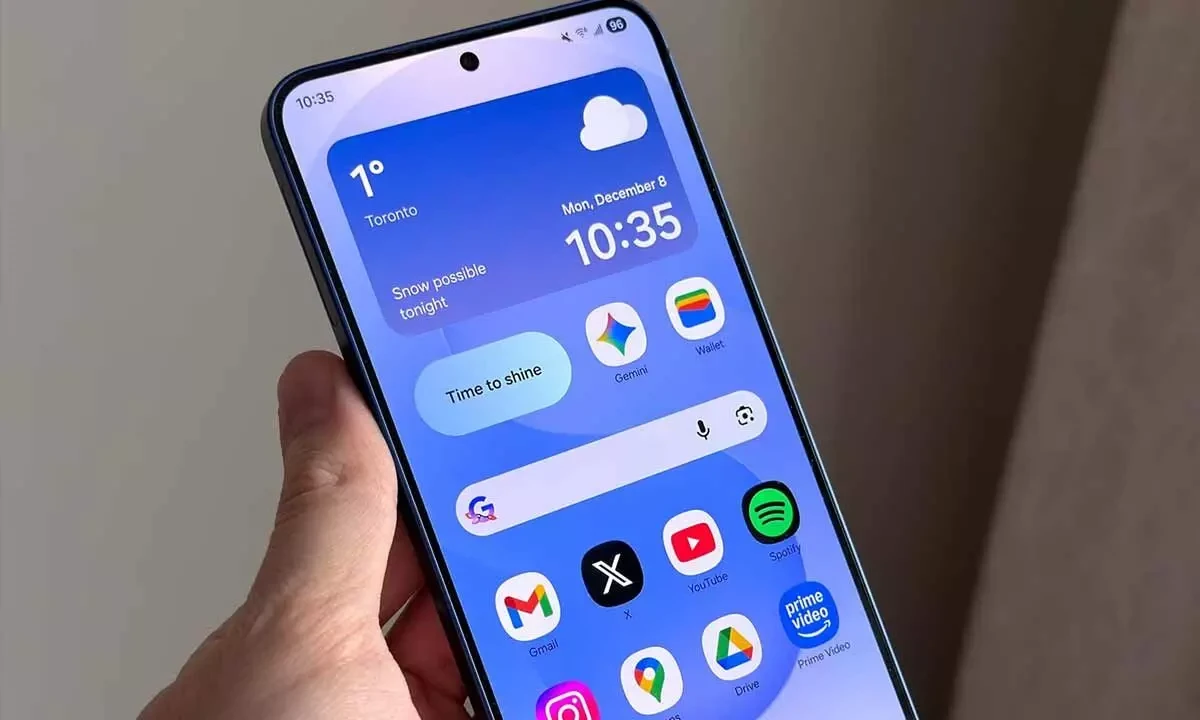
One UI 8.5 Beta 3 Released in India: Everything You Need to Know About Samsung's Biggest Software Update
Samsung has officially rolled out One UI 8.5 Beta 3 to Galaxy S25 series users in India, marking a significant milestone in the development of what is arguably the most ambitious One UI update in Samsung's history. Built on Android 16, One UI 8.5 represents a complete visual and functional overhaul of Samsung's software experience, introducing Google's controversial Liquid Glass design language, advanced AI features, and dozens of quality-of-life improvements.
If you own a Galaxy S25, Galaxy S25+, or Galaxy S25 Ultra, this article is your comprehensive guide to everything One UI 8.5 Beta 3 brings, how to install it, what bugs have been fixed, and what to expect in the months ahead as Samsung races toward a stable release alongside the Galaxy S26 launch.
What Is One UI 8.5 and Why Does It Matter?
One UI 8.5 is Samsung's next major software release, succeeding One UI 8.0 (which itself was based on Android 16). Think of it this way: One UI 8.0 was the foundation update that brought Android 16's core features to Samsung devices, while One UI 8.5 is the feature-packed release that builds on that foundation with Samsung's own innovations, design changes, and AI integrations.
This distinction matters because One UI 8.5 will be the version that ships with the Galaxy S26 series, announced at Galaxy Unpacked on February 25, 2026, with availability expected in March 2026. Every Galaxy S26 buyer will experience One UI 8.5 out of the box, and Samsung will subsequently roll it out to 50+ older devices including the Galaxy S24 series, Galaxy S23 series, Galaxy Z Fold and Flip models, Galaxy A-series phones, and even select Galaxy tablets.
Beta 3 Technical Details
Before diving into features, here are the technical specifics of the Beta 3 build released in India:
| Detail | Specification |
|---|---|
| Firmware Version | ZA3 |
| Download Size | ~1.2 GB |
| Security Patch | January 2026 |
| Base OS | Android 16 |
| Eligible Devices (Beta) | Galaxy S25, Galaxy S25+, Galaxy S25 Ultra |
| India Beta Label | Beta 2 (offset from global numbering) |
| Beta 4 Release | February 9, 2026 |
| Stable Release | Expected March 2026 (with Galaxy S26) |
An important note for Indian users: due to Samsung's staggered beta rollout schedule, what is globally labeled as Beta 3 appears as Beta 2 in India. This is because India joined the beta program one cycle after Korea and the United States. The features and firmware version (ZA3) are identical regardless of the label.
Liquid Glass Design: Samsung's Visual Revolution
The single most visible change in One UI 8.5 is the adoption of Google's Liquid Glass design language, which was introduced at Google I/O 2025 as the next evolution of Material Design. Liquid Glass is characterized by translucent, glass-like UI elements that refract and reflect the content behind them, creating a sense of depth and dimensionality across the interface.
What Changes with Liquid Glass?
- Quick Settings Panel: Completely redesigned with frosted glass tiles that blur the background. Samsung has split the Quick Settings into a Split Quick Panel — notifications pull down from the left side of the status bar, and Quick Settings tiles pull down from the right side. This mirrors the approach Google has taken in stock Android 16.
- System Icons: All system icons — Wi-Fi, Bluetooth, battery, signal strength — have been redrawn with a glassy, semi-transparent aesthetic. The icons now have subtle light reflections that respond to the device's orientation.
- Settings App: The entire Settings hierarchy has been redesigned with Liquid Glass cards, rounded edges, and translucent section headers.
- Lock Screen: New clock styles with glass-effect text and widgets that blend into the wallpaper using blur and refraction effects.
- Samsung Apps: Samsung's first-party apps — Phone, Messages, Calendar, Gallery, My Files — have all been updated to use Liquid Glass elements.
User Reception: Divisive Opinions
The Liquid Glass design has been one of the most divisive changes in Android's recent history. Early beta testers are sharply split:
| Positive Feedback | Negative Feedback |
|---|---|
| Modern and premium visual appearance | Reduced readability in bright sunlight |
| Smooth animations and transitions | Increased GPU load affects battery on older devices |
| Consistent design language across apps | Transparency effects can be distracting |
| Dynamic blur effects look sophisticated | Some users find it resembles iOS too closely |
Samsung has included an option to reduce transparency effects in Accessibility settings for users who prefer a more traditional look.
AI Features: The Intelligence Layer
One UI 8.5 represents Samsung's most aggressive push into on-device AI, building on the Galaxy AI foundation introduced with the Galaxy S24 series. Here are the major AI additions:
Now Nudges
Now Nudges is Samsung's proactive AI assistant that surfaces contextual suggestions throughout your day without you needing to ask. Examples include:
- Reminding you to leave for a meeting based on current traffic conditions and your calendar
- Suggesting you call back someone whose call you missed, based on your communication patterns
- Alerting you to flight delays and automatically pulling up your boarding pass
- Recommending restaurants near your current location during lunch hours based on your past preferences
Now Nudges integrates with Samsung's Now Brief, which provides a daily AI-generated summary of your schedule, weather, commute, and relevant news. In Beta 3, Samsung has fixed several bugs that caused Now Brief to display incorrect weather data and miss calendar events.
Bixby + Perplexity Integration
In a surprising partnership, Samsung has integrated Perplexity AI into Bixby, giving Samsung's voice assistant access to real-time web search results with AI-powered summaries. This means Bixby can now answer complex, multi-part questions with cited sources — a capability that was previously its biggest weakness compared to Google Assistant and Siri with Apple Intelligence.
When you ask Bixby a factual question, it now routes the query through Perplexity's search engine, retrieves relevant results, synthesizes an answer, and presents it with source links. This integration is available in India and works in English; Tamil language support is expected in a future update.
Type for Edit: AI Photo Editing
Type for Edit is a new AI-powered photo editing tool in the Samsung Gallery app. Instead of manually selecting tools and adjusting parameters, you simply type a natural language instruction describing what you want to change. Examples:
- "Remove the person in the background"
- "Make the sky more blue and dramatic"
- "Change the lighting to golden hour"
- "Remove the watermark from the corner"
The AI processes your instruction and applies the edit. You can chain multiple instructions together and undo individual steps. This feature requires a data connection for processing on Samsung's cloud servers.
Privacy and Security Features
Privacy Display
Privacy Display is a software-based feature that narrows the viewing angle of your screen, making it difficult for people sitting next to you to see your content. Unlike hardware-based privacy screens, Samsung's implementation works by adjusting pixel brightness and contrast at extreme viewing angles. It can be toggled on and off from the Quick Settings panel and is particularly useful for reading sensitive messages or banking apps in public transport — a common scenario for Indian commuters.
Direct Voicemail
Direct Voicemail is a new feature that uses on-device AI to answer calls you cannot take, transcribe the caller's message in real time, and display the transcription on your screen. You can then choose to pick up the call, send a quick reply, or let the voicemail complete. This feature works without carrier voicemail support and processes everything locally on the device. It is available in English in India, with Hindi and Tamil support planned for a later update.
Storage Share
Storage Share allows you to share a portion of your phone's storage with another Samsung device over a local network. This is essentially a wireless external drive feature — you designate a folder on your phone, and another Samsung device can access and transfer files to and from that folder without needing internet connectivity. This is useful for transferring large files like videos when you do not have a USB cable handy.
Bug Fixes in Beta 3
Beta 3 (ZA3) addresses several issues reported by beta testers in previous builds:
| Bug | Status in Beta 3 |
|---|---|
| Lock screen clock occasionally displaying wrong time | Fixed |
| Excessive battery drain during standby | Improved (not fully resolved) |
| Gallery app lag when scrolling through large libraries | Fixed |
| Now Brief showing incorrect weather information | Fixed |
| Phone app favorites section crashing | Fixed |
| Liquid Glass animations stuttering on Galaxy S25 (non-Ultra) | Improved |
| Split Quick Panel occasionally unresponsive | Fixed |
Samsung released Beta 4 on February 9, 2026, which is expected to address the remaining battery drain issues and polish the Liquid Glass animations further before the stable release.
How to Enroll in the One UI 8.5 Beta in India
If you own a Galaxy S25, Galaxy S25+, or Galaxy S25 Ultra and want to try One UI 8.5 before the stable release, here is how to join the beta program:
Step-by-Step Guide
- Requirements: You need a Galaxy S25 series device with an active Indian SIM card inserted. The device must be running the latest stable One UI version and must not be carrier-locked.
- Open Samsung Members App: Launch the Samsung Members app on your device. If you do not have it, download it from the Galaxy Store.
- Navigate to Beta Registration: Look for the One UI Beta Program banner on the home screen of Samsung Members. Alternatively, go to the "Notices" section and look for the beta enrollment announcement.
- Register: Tap the registration banner and follow the on-screen instructions. You will need to agree to Samsung's beta program terms and conditions.
- Check for Update: After registration (it may take a few minutes to a few hours), go to Settings → Software Update → Download and Install. The beta update should appear.
- Download and Install: The download is approximately 1.2 GB. Use a Wi-Fi connection and ensure your battery is above 50%.
Important Warnings
- Beta software can be unstable. Expect occasional crashes, battery drain, and app compatibility issues. Do not install on your primary device if you depend on it for critical tasks.
- Back up your data before installing. Use Samsung Cloud or Smart Switch to create a full backup.
- Rolling back from beta to stable requires a full factory reset, which erases all data on the device.
- Some banking apps (like GPay, PhonePe, Paytm) may not work correctly on beta firmware due to SafetyNet/Play Integrity checks.
One UI 8.5 Stable Release Timeline
Based on Samsung's official announcements and historical patterns:
| Milestone | Date | Details |
|---|---|---|
| Galaxy S26 Announcement | February 25, 2026 | Galaxy Unpacked event; One UI 8.5 showcased |
| Galaxy S26 Availability | March 2026 | Ships with One UI 8.5 stable |
| Galaxy S25 Series | March-April 2026 | First older devices to receive stable update |
| Galaxy S24, Z Fold/Flip 6 | April-May 2026 | Second wave of updates |
| Galaxy A-series, Tablets | May-July 2026 | Broader rollout to mid-range and tablets |
One UI 8.5 vs One UI 8.0: What Is Actually New?
| Feature | One UI 8.0 | One UI 8.5 |
|---|---|---|
| Design Language | Material You (refined) | Liquid Glass |
| Quick Settings | Combined panel | Split Quick Panel |
| AI Assistant | Bixby (standard) | Bixby + Perplexity |
| Proactive AI | Now Brief (basic) | Now Nudges + improved Now Brief |
| Photo Editing | Generative Edit | Type for Edit (natural language) |
| Privacy | Standard permissions | Privacy Display + enhanced controls |
| Voicemail | Carrier-dependent | Direct Voicemail (on-device AI) |
| File Sharing | Quick Share | Quick Share + Storage Share |
Should You Install the Beta?
The decision depends on your situation:
- Install if: You have a secondary Galaxy S25 device, you enjoy testing new features early, and you can tolerate occasional bugs and banking app issues.
- Wait if: The Galaxy S25 is your only phone, you rely heavily on banking apps like GPay or PhonePe, or you need guaranteed stability for work.
- Best approach: Wait for the stable release in March-April 2026. The wait is only 4-8 weeks, and you will get a polished experience without the beta headaches.
Conclusion
One UI 8.5 Beta 3 represents a substantial step forward for Samsung's software experience. The Liquid Glass design, while divisive, gives Samsung devices a fresh modern look. The AI features — particularly Now Nudges, Bixby + Perplexity, and Type for Edit — are genuinely useful additions that move Samsung closer to the proactive AI experience that Apple and Google have been building toward. The privacy features like Privacy Display and Direct Voicemail address real-world needs, especially for Indian users who frequently use their phones in crowded public spaces.
With Beta 4 already released on February 9 and the Galaxy S26 announcement on February 25, the stable release of One UI 8.5 is imminent. Whether you choose to try the beta now or wait, One UI 8.5 is shaping up to be the most significant Samsung software update in years.



Comments (0)
Be the first to comment!