‹ முகப்புக்கு திரும்ப

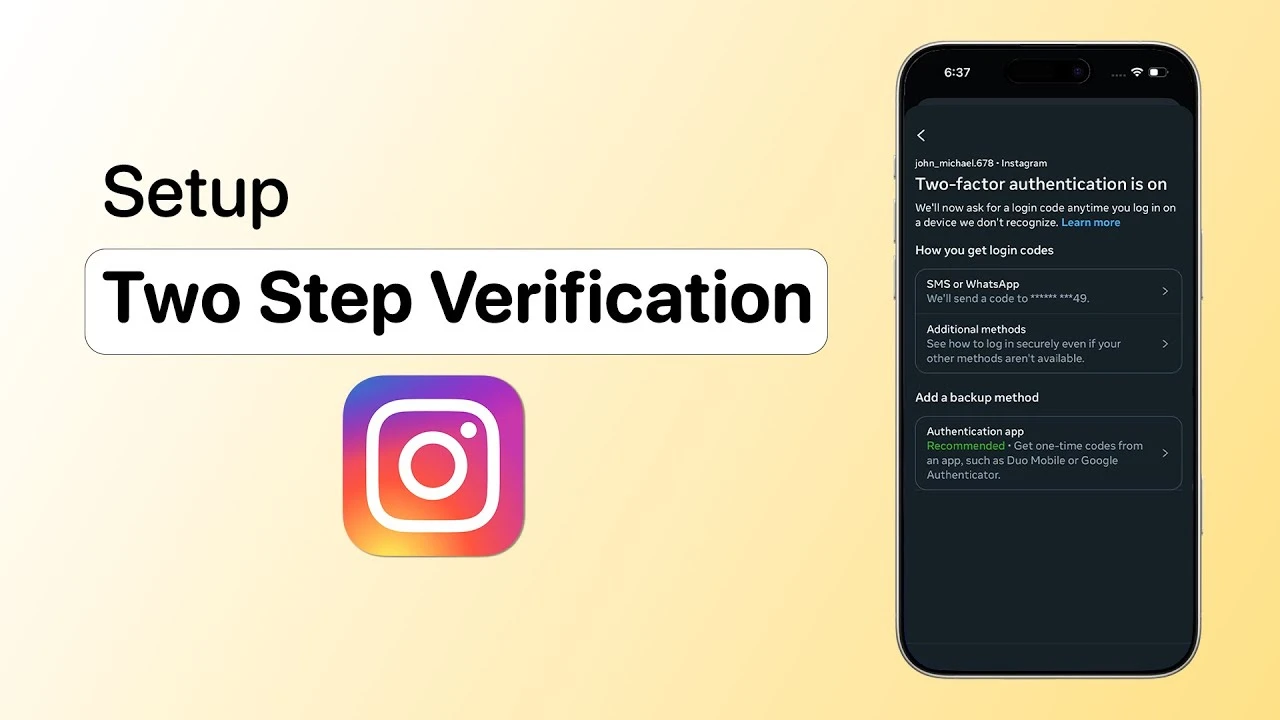
Two Factor Authentication Setup Guide 2026: Google, WhatsApp, Instagram, UPI & Banking — படிப்படியான வழிகாட்டி

Two factor authentication (2FA) setup முழு வழிகாட்டி. Google, WhatsApp, Instagram, Facebook, Twitter/X, Amazon India, UPI apps (GPay, PhonePe), banking apps (SBI, HDFC, ICICI), Apple ID setup steps. Best authenticator apps, YubiKey India price, passkeys, backup codes, common mistakes.

Keerthika 2 min read 158
Google-ல் Follow
அப்டேட் 1 மாதம் முன் அதிகாரப்பூர்வ ஆதாரம்: National Cyber Crime Reporting Portal
Online Safety Two Factor Authentication Setup Guide 2026: Google, WhatsApp, Instagram, UPI & Banking — படிப்படியான வழிகாட்டி 2 நிமிடம் மீதம் Google-ல் Follow
Two Factor Authentication Setup Guide 2026: Google, WhatsApp, Instagram, UPI & Banking — படிப்படியான வழிகாட்டி

தமிழ்டெக் AI சுருக்கம்

சமீபத்திய அறிக்கையின்படி, இரண்டு-படி அங்கீகரிப்பு (Two-Factor Authentication - 2FA) முறையை பயன்படுத்துவதன் மூலம் 99.9% ஹேக் முயற்சிகளைத் தடுக்க முடியும். ஆனால் இந்தியாவில் சைபர் மோசடிகளால் 2024-ல் மட்டும் சுமார் 22,845 கோடி ரூபாய் இழப்பு ஏற்பட்டுள்ளது. இதற்குக் காரணம், பலர் கடவுச்சொல்லை (Password) மட்டும் பயன்படுத்துவதும், 2FA-வை செயல்படுத்தாததும்தான். 2FA என்பது உங்கள் கணக்கிற்கு கூடுதல் பாதுகாப்பை அளிக்கும். கடவுச்சொல்லை யாராவது கண்டுபிடித்தாலும், 2FA இல்லாமல் உள்நுழைய முடியாது. இந்த கட்டுரையில், பிரபலமான செயலிகளில் 2FA-வை அமைப்பது, சிறந்த அங்கீகரிப்பு செயலிகள் (Authenticator Apps), காப்புப் பிரதி குறியீடுகள் (Backup Codes), பாஸ்கீகள் (Passkeys), யூபி-கீ (YubiKey) போன்றவற்றை எப்படி பயன்படுத்துவது என்பது பற்றி விரிவாக விளக்கப்பட்டுள்ளது. SMS OTP, Authenticator App, Hardware Key, Biometric, Passkeys போன்ற 2FA வகைகளின் நன்மை தீமைகளையும் பட்டியலிட்டுள்ளது. Google, WhatsApp, Instagram, Facebook, Twitter, Amazon, UPI Apps, Banking Apps போன்ற பிரபலமான சேவைகளில் 2FA-வை அமைப்பதற்கான வழிமுறைகளையும் வழங்குகிறது. கூடுதலாக, சிறந்த அங்கீகரிப்பு செயலிகள், காப்புப் பிரதி குறியீடுகளைப் பாதுகாப்பாக சேமிப்பது, பாஸ்கீகள் மற்றும் யூபி-கீயின் பயன்பாடு பற்றியும் விளக்குகிறது. 2026-ல் 2FA கட்டாயமாக்கப்படவுள்ளதால், மின்னஞ்சல், வங்கிச் சேவைகள், வாட்ஸ்அப், சமூக ஊடகங்கள் மற்றும் ஷாப்பிங் தளங்களில் 2FA-வை உடனடியாக செயல்படுத்தி, சைபர் தாக்குதல்களிலிருந்து பாதுகாப்பாக இருக்க வேண்டியதன் அவசியத்தை வலியுறுத்துகிறது.

AI உதவியுடன் தயாரான சுருக்கம் — தமிழ்டெக் எடிட்டர்ஸ் சரிபார்த்தது.

0:00
0:00
🔒 Listen வசதி subscribers-க்கு மட்டும். Subscribe செய்யுங்கள்

Two-Factor Authentication — 99.9% Hack Attacks தடுக்கும் Simple Setup!

Microsoft data படி MFA enable பண்ணினா 99.9% automated hack attempts prevent. Google: recovery phone add பண்ணினா 99% phishing block. ஆனா India 2024-ல் Rs 22,845 crore cyber fraud loss. முக்கிய காரணம் — password மட்டும் use பண்றது, 2FA enable பண்றதில்ல.

Two-Factor Authentication = account-க்கு extra lock. Password guess பண்ணினாலும் 2FA இல்லாம உள்ளே வர முடியாது. இந்த guide-ல் எல்லா popular apps 2FA setup, best authenticator apps, backup codes, passkeys, YubiKey India — எல்லாம் explain பண்றோம்.

2FA என்றால் என்ன?

Two different verification types required:

  • Something You Know: Password, PIN
  • Something You Have: Phone (OTP), Security Key, Authenticator App
  • Something You Are: Fingerprint, Face Recognition

இவற்றில் 2 combine = 2FA. Example: Password + Phone OTP. Attacker password steal பண்ணினாலும் phone இல்லாம account-க்குள் வர முடியாது.

Effectiveness

  • 99.9% automated hack prevent (Microsoft)
  • 99% phishing block (Google)
  • 80% breaches 2FA-ஆல் prevent

2FA வகைகள்

RBI April 2026: 2 different auth factors mandatory.

8. Banking Apps

Bank2FA
SBIUser ID + Password + OTP. YONO: MPIN + biometric
HDFCCustomer ID + Password + OTP. Mobile: MPIN + fingerprint
ICICIiMobile: debit card + PIN + biometric

9. Microsoft/Outlook

  1. account.microsoft.com/security → Two-step verification → Turn on

10. Apple ID

  1. Settings → Your name → Sign-In & Security → Two-Factor Authentication

Best Authenticator Apps

AppCloud SyncOpen SourceBest For
Google AuthenticatorYesNoSimple use
Microsoft AuthenticatorYesNoEnterprise
AuthyYesNoMulti-device
Aegis (Android)NoYesPrivacy-first
Ente AuthYesYesCross-platform

Beginners: Google Authenticator. Multi-device: Authy. Privacy: Aegis/Ente Auth.

Backup Codes — Phone தொலைந்தால்?

  • ✅ Print பண்ணி safe-ல் வைங்க
  • ✅ Encrypted USB drive
  • ✅ Password manager (Bitwarden)
  • ❌ Cloud notes, email-ல் save பண்ணாதீங்க

Phone lost → Backup codes use / Cloud-synced authenticator restore / Carrier-கிட்ட SIM transfer → SMS OTP.

Passkeys — Future of Authentication

  • 1 billion+ passkeys globally generated
  • 95% devices passkey-ready
  • Passwords-ஐ விட 40% faster
  • Google, Apple, Microsoft, WhatsApp support
  • Setup: myaccount.google.com → Security → Passkeys → Create

Common Mistakes

MistakeSolution
SMS OTP மட்டும் relyAuthenticator app use
Backup codes save இல்ல2 locations-ல் save
Same phone for everythingMethods stagger
Email-ல் 2FA இல்லEmail first-ஆ enable
Push blindly approveRequest verify பண்ணுங்க

YubiKey India Price & Guide

ModelPriceWhere
Security Key NFC₹3,500-₹4,500Amazon.in
YubiKey 5 NFC₹5,250-₹9,990Flipkart, Amazon
YubiKey 5C NFC₹6,500-₹10,500Flipkart, KnitLogix

USB plug in / NFC tap → Service-ல் "Add Security Key" → Touch → Done. Google, Microsoft, GitHub, Facebook support.

2FA Priority

  1. 🔴 Email (Gmail) — Master key
  2. 🔴 Banking/UPI — Direct money
  3. 🟡 WhatsApp — Primary communication
  4. 🟡 Social Media — Identity protection
  5. 🟢 Shopping — Payment details

முடிவுரை

2FA 2026-ல் optional இல்ல — essential. 99.9% attacks prevent. இன்றே Gmail 2FA enable → WhatsApp PIN set → Instagram authenticator → Banking biometric → Backup codes save. 30 minutes work — 99.9% safer!

அடிக்கடி கேட்கப்படும் கேள்விகள்

5

Two-factor authentication என்றால் என்ன? ஏன் தேவை?

2FA = password-க்கு மேல் extra verification — phone OTP அல்லது authenticator app code. Password மட்டும் safe இல்ல. Microsoft data: 2FA enable பண்ணினா 99.9% hack attempts prevent. India 2024-ல் Rs 22,845 crore cyber fraud loss — 2FA enable பண்ணியிருந்தா பெரும்பாலானவை prevent ஆகியிருக்கும்.

Best authenticator app எது?

Beginners: Google Authenticator — free, offline works, cloud sync support. Multi-device: Authy. Privacy: Aegis (Android, open-source) அல்லது Ente Auth (cross-platform). எல்லாம் free. SMS OTP மட்டும் rely பண்ணாதீங்க — SIM swap attacks 2024-ல் 1,055% increase.

WhatsApp-ல் 2FA எப்படி setup பண்றது?

WhatsApp → Settings → Account → Two-step verification → Enable → 6-digit PIN create → Confirm → Recovery email add → Done. வாரத்திற்கு ஒரு முறை PIN re-enter கேக்கும். New device-ல் number register பண்ணும்போது இந்த PIN கட்டாயம் — unauthorized access prevent.

Phone தொலைந்தா 2FA-ஆல் lock ஆகிடுமா?

Backup codes save பண்ணியிருந்தா உடனே login. Cloud-synced authenticator (Google Authenticator, Authy) new phone-ல் auto-restore. இரண்டும் இல்லையானா telecom operator-கிட்ட SIM transfer → SMS OTP. Last resort: account recovery (days ஆகலாம்). Best practice: backup codes 2 separate secure locations-ல் save.

Passkeys 2FA-ஐ விட better-ஆ?

Passkeys next evolution — public-key cryptography + biometrics. Password தேவையில்ல, phishing-proof, 40% faster. 1 billion+ passkeys globally. Google, Apple, Microsoft, WhatsApp support. Service passkeys offer பண்ணா switch பண்ணுங்க. இல்லாத services-க்கு authenticator app 2FA continue பண்ணுங்க.

நாளைய டெக் செய்திகள் உங்க WhatsApp-க்கே

தினமும் ஒரு சின்ன update, இலவசம். TamilTech channel-ஐ follow பண்ணுங்க.

What do you think?

people reacted

Keerthika

தமிழ்டெக் எடிட்டோரியல் டீம் · 3,601 கட்டுரைகள்

Keerthika is an editor at TamilTech, the Tamil and English technology publication founded by Praveen Kumar S. She covers AI, smartphones, gadgets, EVs, startups and cybersecurity i...

மேலும் Keerthika

WhatsApp-ல் TamilTech-ஐக் கேளுங்க

டெக் சந்தேகமா? தமிழிலோ ஆங்கிலத்திலோ கேளுங்க — எங்க WhatsApp அசிஸ்டன்ட் TamilTech கட்டுரைகளில் இருந்து சில நொடிகளில் பதில் சொல்லும்.

தொடர்புடைய செய்திகள்

கருத்துகள் (0)

| Supports **bold**, *italic*, `code`

Be the first to comment!

அடுத்த செய்தி TikTok-க்கு முதல் US Trial: Teen-ங்க Feed-ஐப் பத்திதான் வழக்கு
TamilTech

TamilTech

Install app for faster access

Earn XP 🏆
WhatsApp
Notifications