


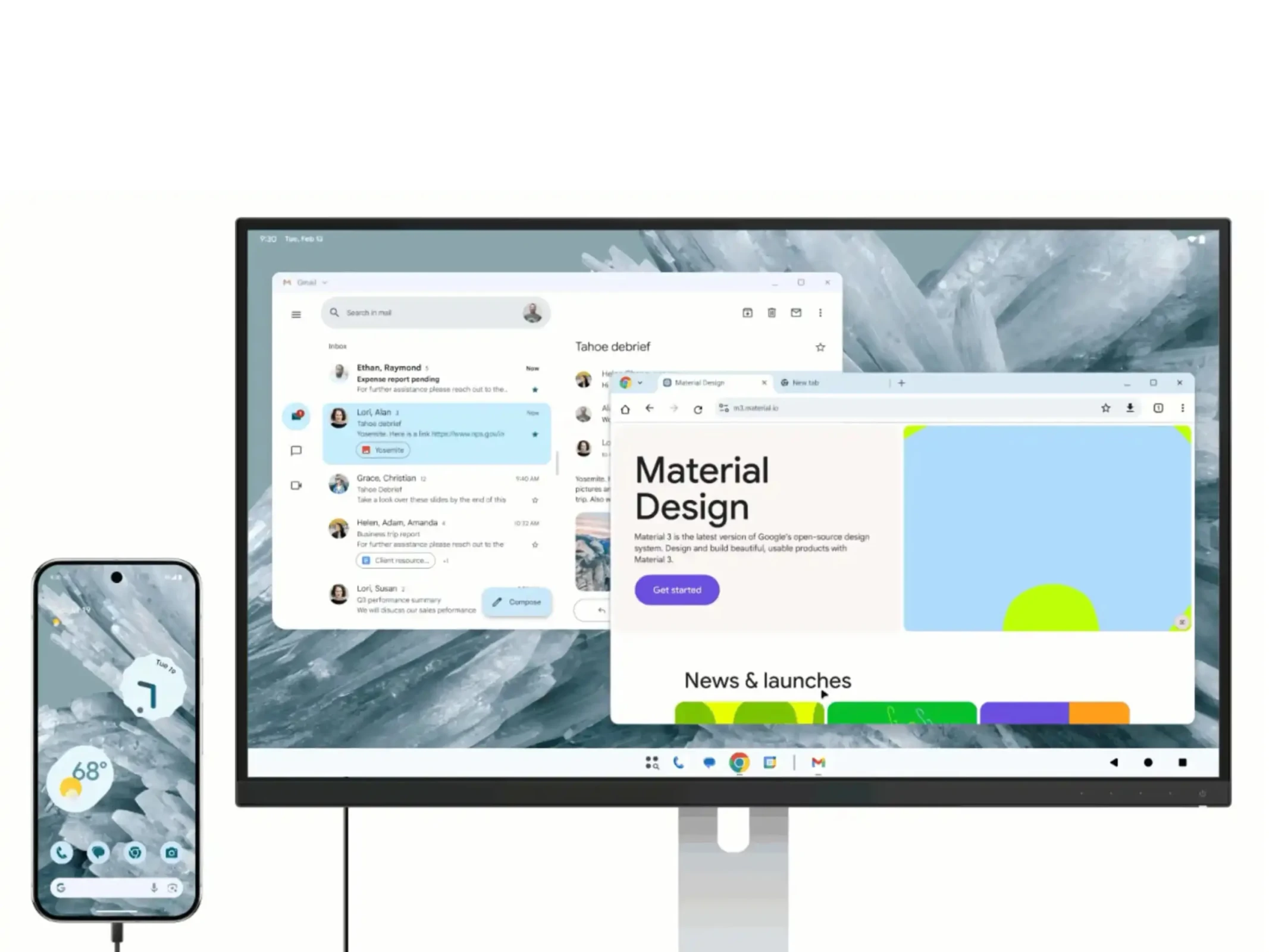
Google Pixel Finally Gets Desktop Mode: Android's Answer to Samsung DeX Is Here
For years, Samsung Galaxy users have enjoyed DeX — a feature that turns their phone into a desktop computer when plugged into a monitor. Now, Google is bringing the same power to Pixel phones. Android's long-awaited desktop mode is moving from a hidden developer setting to a proper, polished feature — and it could change the way millions of people work.
If you have ever wished your Pixel phone could replace your laptop for basic tasks — replying to emails, editing documents, browsing the web — that future is arriving faster than you think.
What Is Pixel Desktop Mode?
Desktop mode allows a Pixel phone, when connected to an external monitor (via a USB-C to HDMI cable or dock), to display a full desktop-style interface. This means:
- Apps appear in resizable, draggable windows (like a real PC)
- A taskbar at the bottom for switching between apps
- Mouse and keyboard support for full productivity
- The phone's screen can act as a touchpad or secondary display
- Multi-window multitasking — just like Windows or macOS
Android desktop mode has technically existed as a hidden feature in developer options since Android 10, but it was buggy, incomplete, and not meant for everyday users. Google is now officially making it a first-class feature.
Why This Matters — Especially for India
India has a unique computing reality: hundreds of millions of people own smartphones but not laptops. For students in tier-2 and tier-3 cities, for freelancers working from small spaces, and for professionals who travel frequently — a phone that doubles as a desktop PC is genuinely transformative.
Consider this scenario: A student in Chennai uses their Pixel phone daily. With desktop mode, they can plug into their college computer lab monitor, connect a keyboard and mouse, and type assignments, browse research, and run productivity apps — all without ever buying a laptop.
A salesperson in Pune travelling between clients carries only their Pixel. At the hotel, they plug into the room TV (if it has HDMI), connect a Bluetooth keyboard, and suddenly have a full working environment for presentations and reporting.
How It Compares to Samsung DeX
| Feature | Google Pixel Desktop Mode | Samsung DeX |
|---|---|---|
| App Windowing | Yes | Yes |
| Taskbar | Yes | Yes |
| Mouse and Keyboard | Yes | Yes |
| Wireless Desktop | In Development | Yes (select models) |
| App Optimization | Growing | Mature ecosystem |
| Available on budget phones | No — Pixel only for now | No — Galaxy only |
| Open to other OEMs | Yes — Android platform level | No — Samsung exclusive |
The biggest advantage Pixel's approach has over Samsung DeX is that it is built into Android at the platform level. This means other Android phone makers — OnePlus, Nothing, Motorola — could eventually adopt the same feature. Samsung's DeX remains proprietary and limited to Galaxy devices.
What Hardware Do You Need?
To use Pixel Desktop Mode, you will need:
- A Pixel phone (Pixel 8 or newer expected to have the best support)
- USB-C cable or dock with DisplayPort or HDMI output (look for USB-C Alt Mode support)
- External monitor or TV with HDMI input
- Bluetooth or USB keyboard and mouse for full productivity
Many affordable docks are available in India on Amazon and Flipkart for Rs. 1,500 to Rs. 4,000. A monitor can be purchased for as low as Rs. 7,000 to Rs. 10,000 for a basic 21-inch FHD panel. The entire setup cost can be kept very low compared to buying a laptop.
Which Pixel Models Will Get Desktop Mode?
While Google has not released a finalized device compatibility list, based on hardware and software trajectory, here is what we expect:
- Pixel 9, 9 Pro, 9 Pro XL, 9 Pro Fold — Full support, optimized experience
- Pixel 8, 8 Pro, 8a — Full support
- Pixel 7, 7 Pro, 7a — Likely supported with Android 16
- Pixel 6 series — Basic support possible, not guaranteed
The Pixel 9 Pro Fold is especially interesting — its large inner display already behaves like a mini tablet, and desktop mode on an external monitor would make it a true three-in-one device: phone, tablet, and desktop.
Android 16 and the Desktop Mode Push
Google is tying the polished desktop mode experience to Android 16, which is expected to release in mid-2025. Android 16 introduces major improvements to large-screen and external display handling, including:
- Better window management APIs for app developers
- Improved taskbar behavior
- Predictive back gestures adapted for desktop use
- Enhanced multi-instance app support
Google is also pushing app developers to build apps that work well across phone, tablet, and desktop form factors. This is similar to Apple's push for iPad-optimized apps, but for Android's broader ecosystem.
Real-World Use Cases
For Students
Carry your Pixel to class. In the library or computer lab, plug into any monitor and use Google Docs, Sheets, and your browser in proper windowed mode. No need for a laptop bag or charger.
For Freelancers and Entrepreneurs
Many small business owners in India juggle between phone and laptop. With desktop mode, your phone becomes your office — invoicing, email, spreadsheets, video calls, all on a bigger screen.
For Remote Workers
Work-from-home becomes truly flexible. A single Pixel phone with a Rs. 2,000 dock and an existing monitor is a complete workstation. No Windows license needed, no heavy laptop battery anxiety.
For Travelers
Business travelers and digital nomads can pack light. A phone, a small USB-C dock, and a foldable Bluetooth keyboard weigh almost nothing compared to a laptop.
Limitations to Know About
Desktop mode is not a perfect laptop replacement — at least not yet. Here are the honest limitations:
- App compatibility: Not all Android apps are optimized for windowed/desktop use. Some will letterbox or behave oddly.
- No x86 software: Windows programs do not run. This is Android — only Android apps.
- Heat management: Running a desktop session is processor-intensive. Expect some phone heating.
- Storage: Your phone's internal storage is your only storage (unless you use cloud or USB OTG drives).
- Browser limitations: Chrome on Android works well, but some websites still default to mobile views.
The Bigger Picture: One Device Future?
Google's desktop mode push is part of a broader industry trend: the convergence of smartphones and PCs. Microsoft tried this with Continuum (which failed). Samsung succeeded with DeX for a niche but loyal user base. Now Google is going mainstream with it.
The vision: your smartphone is your only personal computer. At home, you plug it into a monitor. On the go, it is your phone. This eliminates the need for most people to own a separate laptop — a compelling proposition in a price-sensitive market like India.
With 5G speeds making cloud apps faster, and Gemini AI built into Android making the experience smarter, a Pixel with desktop mode could genuinely serve as the only computing device most Indians need.
Conclusion
Google Pixel's desktop mode is more than a gimmick — it is a genuine productivity unlock for millions of users who want to do more with their phones. While Samsung DeX has had a head start, Google's approach of baking this into Android at the platform level means it has far more potential to scale across devices and price points.
For Indian users especially, this could be a game-changer. Affordable hardware, a booming gig economy, and a smartphone-first culture make India the perfect market for a phone-as-desktop future. Keep an eye on Android 16 and the Pixel 9 series — the desktop revolution is coming.





Comments (0)
Be the first to comment!