


WhatsApp Guest Chats Rolling Out on Android and iOS: Chat Without an Account
WhatsApp is rolling out one of its most significant new features in years — Guest Chats. For the first time, WhatsApp users can now invite people who don't have a WhatsApp account to join a conversation, without requiring them to download the app or create an account. The feature is currently being rolled out to Android and iOS beta users and is expected to reach all users soon.
For over two billion WhatsApp users worldwide — and over 500 million in India — this changes a fundamental limitation of the platform: you always needed a phone number and a WhatsApp account to participate in a conversation. Guest Chats removes that barrier entirely.
What Are WhatsApp Guest Chats?
Guest Chats allow a WhatsApp account holder to generate a special invite link and share it with someone who doesn't have WhatsApp. The recipient can open that link in any browser — on mobile or desktop — and join the conversation as a guest, without installing the app or registering a phone number.
The feature is similar in concept to how Zoom or Google Meet works — you share a link, and people can join. Only this time, it's for private messaging on WhatsApp.
How Does It Work? Step by Step
- Generate the link: The WhatsApp account holder goes to "Invite a friend" or the bottom of their contacts list and generates a unique guest chat invite link.
- Share the link: The link can be shared via SMS, email, or any other messaging app. You can copy it and send it through any channel.
- Recipient opens the link: The non-WhatsApp user opens the link in their browser on mobile or desktop.
- Choose how to join: A prompt appears asking whether they want to Download WhatsApp or Continue as a Guest.
- Enter a name: Guests are asked to enter a name (can be a pseudonym) so the other person can recognize them.
- Start chatting: The conversation opens on WhatsApp Web in the browser. The guest can start messaging immediately.
End-to-End Encryption: Privacy Protected
One of the most important aspects of Guest Chats is that they are fully end-to-end encrypted. When a guest joins, WhatsApp Web generates a unique identifier that creates the encryption key for the conversation. This means:
- WhatsApp cannot see the content of messages in guest chats
- Only the two participants in the conversation can read the messages
- Both parties can verify encryption by scanning a QR code or manually comparing security codes
This level of encryption is the same that WhatsApp uses for all its regular chats — a strong privacy guarantee even for temporary guest conversations.
What the "Guest" Experience Looks Like
WhatsApp clearly marks guest conversations so there is no confusion:
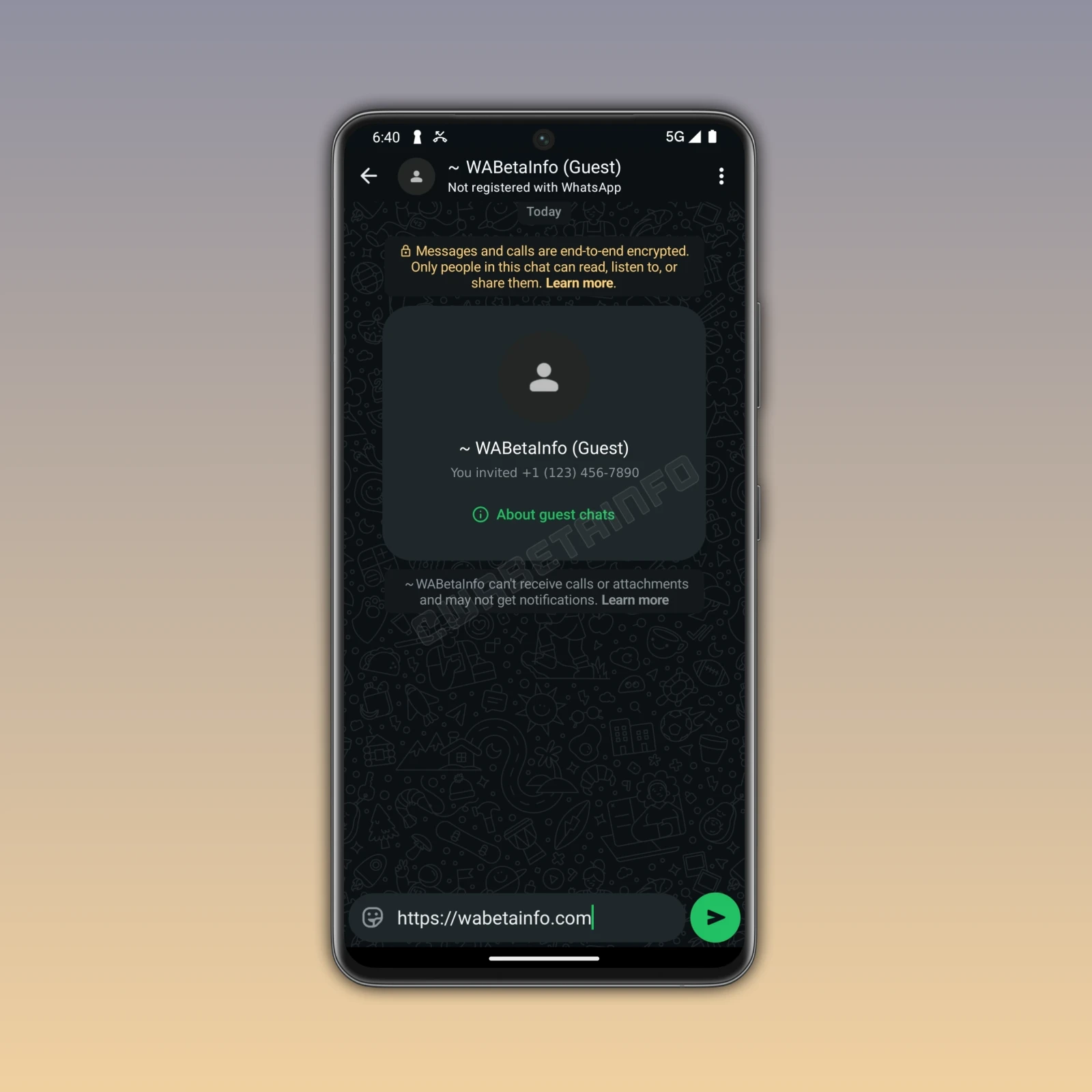
- The word "Guest" appears in the top app bar of the chat
- A label inside the chat highlights that the account is not registered with WhatsApp
- The regular account holder can easily identify when a guest has responded to their invitation
- Guests can currently see the phone number of the person who invited them
Guest Chat Limitations: What's Not Supported
Since guest chats are designed for temporary, lightweight access, several features are not available:
| Feature | Available for Guests? |
|---|---|
| Text messaging | ✅ Yes |
| End-to-end encryption | ✅ Yes |
| Group chats | ❌ Not supported |
| Photo / Video sharing | ❌ Not supported |
| Document sharing | ❌ Not supported |
| Stickers | ❌ Not supported |
| Voice messages | ❌ Not supported |
| GIF sharing | ❌ Not supported |
| Voice calls | ❌ Not supported |
| Video calls | ❌ Not supported |
| Push notifications for guests | ❌ May not receive |
| Code Verify browser extension | ❌ Not compatible |
These limitations are intentional — guest chats are meant for basic, temporary text communication, not a full replacement for a WhatsApp account.
Expiry: 10 Days of Inactivity
Guest chats are not permanent. A guest chat automatically expires after 10 days of inactivity. If the conversation goes silent for 10 days, the link becomes invalid. The inviter would then need to generate a new invite link if they want to reconnect with the same guest.
This is an important detail for users who plan to use Guest Chats for ongoing communication — both parties need to remain active in the conversation to keep it alive.
Notifications: Guests Must Check Manually
A key limitation to be aware of: guests may not receive push notifications for new messages. This means the guest has to proactively open the browser link to check if new messages have arrived. This is a significant difference from the regular WhatsApp experience and could lead to missed messages in time-sensitive conversations.
Blocking Guests: Full Control for Account Holders
WhatsApp gives account holders full control over their guest chats:
- You can block a guest the same way you block a regular WhatsApp contact
- Open the guest chat → tap the guest's name → select "Block" → confirm
- Once blocked, the guest can no longer send messages in that conversation
- Importantly: only guests you personally invited can contact you — guests invited by others cannot reach you
Security Considerations: Know the Risks
WhatsApp has been transparent about an important security limitation:
"Guests are not verified by WhatsApp. There is no guarantee that the person who opens the chat invite link is actually the intended recipient."
This means:
- If you send the link via email and the email account is compromised, someone else could join your chat
- If the recipient changes their phone number, someone else could potentially access the link
- Always verify you are talking to the intended person before sharing sensitive information in a guest chat
WhatsApp recommends sharing the invite link only through trusted channels and verifying the identity of the guest before discussing anything private.
Why WhatsApp is Building This
Guest Chats serve two strategic purposes for Meta (WhatsApp's parent company):
1. User Acquisition
When a non-WhatsApp user receives a guest chat invite and has a seamless experience chatting through the browser, the natural next step is to sign up for a full WhatsApp account. Guest Chats are essentially a low-friction onboarding experience — a "try before you install" approach.
2. Competing with Other Messaging Platforms
Platforms like Telegram allow users to join channels and groups without phone number verification. iMessage works across Apple devices. Signal allows usernames. WhatsApp Guest Chats is Meta's answer to reducing the friction of reaching someone who isn't already on WhatsApp — a real-world problem for businesses, event organizers, and communities.
What This Means for India
India is WhatsApp's largest market with over 500 million users. Yet there are still scenarios where guest chats would be incredibly useful for Indian users:
- Small businesses can now reach new customers who don't have WhatsApp — share a guest chat link on your website or business card
- Event organizers can communicate with attendees who haven't installed WhatsApp
- Schools and colleges can onboard parents or students who resist installing new apps
- Government and NGOs can run helplines accessible via a web link without requiring app download
- Freelancers and consultants can accept inquiries from potential clients without sharing their full phone number first
How Is This Different from Third-Party Chats?
WhatsApp previously introduced third-party chat interoperability under the EU's Digital Markets Act (DMA), which allows users of other messaging apps (like Signal or Telegram) to send messages to WhatsApp users. Guest Chats are different — they do not require a separate messaging app at all. The guest uses a browser, making it far more accessible and universal.
Availability: When Can You Use It?
- Current status: Rolling out to select Android beta (v2.25.22.13) and iOS beta testers
- Stable rollout: Expected to reach all users in the coming weeks/months
- Works on latest versions of WhatsApp for Android, iOS, and WhatsApp Web
- Guest side works in any modern browser — Chrome, Safari, Firefox, Edge
To get early access, join the WhatsApp Beta Program on Google Play (Android) or TestFlight (iOS).
Conclusion
WhatsApp Guest Chats is a thoughtful, well-designed feature that finally removes the biggest barrier to WhatsApp communication — the requirement for both parties to have an account. For over two billion users, this opens up new possibilities: reaching new contacts, onboarding customers, communicating across platforms, and more.
The encryption guarantee, block controls, and clear "Guest" labeling show that WhatsApp has balanced openness with privacy and safety. The limitations (no media, no voice, 10-day expiry) keep it purposeful rather than a full-blown account substitute.
Watch for the stable release — it's coming soon, and it will meaningfully change how you use WhatsApp.
Frequently Asked Questions (FAQs)
Q1: What is WhatsApp Guest Chat?
Guest Chat is a new WhatsApp feature that lets you invite people without a WhatsApp account to chat with you. You generate an invite link and share it — they open it in a browser and can start chatting without downloading WhatsApp or creating an account.
Q2: Are WhatsApp Guest Chats end-to-end encrypted?
Yes. Guest chats use the same end-to-end encryption as regular WhatsApp messages. WhatsApp Web generates a unique encryption key when the guest joins. Neither WhatsApp nor anyone else can read the messages.
Q3: How long does a WhatsApp Guest Chat last?
A guest chat expires after 10 days of inactivity. If there's no activity for 10 days, the invite link becomes invalid and the inviter must generate a new one to continue the conversation.
Q4: Can guests send photos and voice messages in WhatsApp Guest Chat?
No. Guest chats only support text messaging. Photos, videos, documents, stickers, GIFs, voice messages, and voice/video calls are not supported. Group chats are also not available for guests.
Q5: Is WhatsApp Guest Chat available now?
Currently, it is being rolled out to select beta users on Android (v2.25.22.13) and iOS. It is expected to reach all stable users in the coming weeks. You can join WhatsApp Beta on Google Play (Android) or TestFlight (iOS) for early access.




Comments (0)
Be the first to comment!