


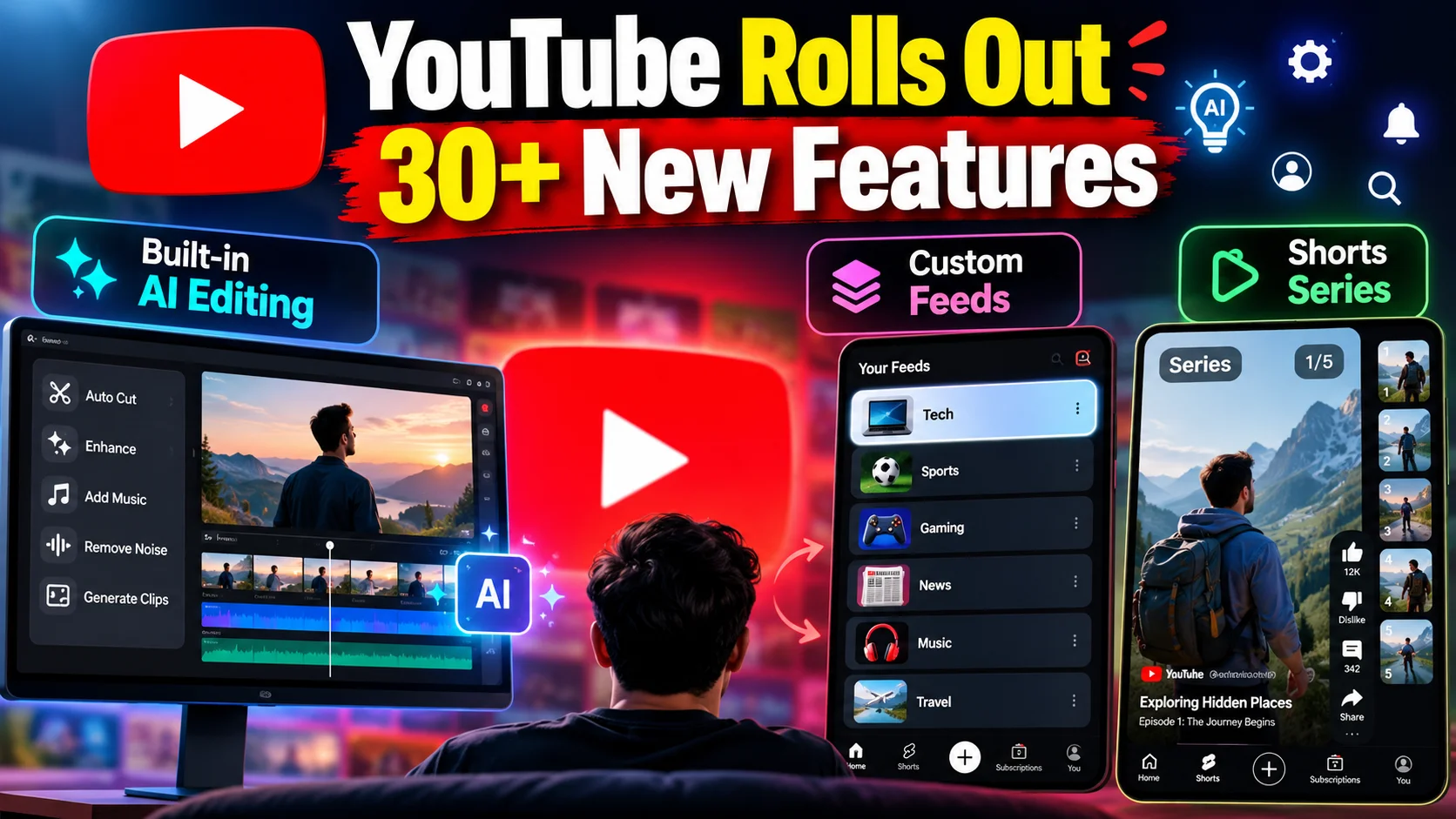
- YouTube is rolling out over 30 new features across mobile, web, and YouTube Studio in 2026.
- Creators get built-in AI video editing tools to cut dead air, generate assets, and polish clips without third-party apps.
- Viewers gain custom algorithmic home feeds and structured Shorts series playlists that end the messy 'Part 2 in comments' search.
- Enhanced playback controls and upgraded creator monetization options round out the update.
What just happened?
Pull up your YouTube app right now, and chances are you use it for practically everything. Morning news over tea, tech teardowns, cooking recipes, or mindless doomscrolling on Shorts during your bus commute. It is the default video engine for millions of Indians.
Now, YouTube is pushing out one of its biggest platform overhauls yet, bundling more than 30 new features in a single rollout wave. The updates target two distinct groups: the people who make the videos and the audience watching them.
For creators, the headline addition is native AI editing right inside YouTube Studio. For viewers, the app is getting custom home feeds, organized Shorts series, and tighter control over playback speed and recommendations. Instead of just tweaking colors or button placements, this update shifts how content gets produced and discovered across the platform.
How does this actually work?
Managing a channel usually means juggling three different apps: shooting footage on your phone, paying for an external editing subscription to trim clips, and finally uploading to YouTube. YouTube is trying to collapse that entire pipeline into one place with new generative AI tools.
The built-in AI assistant helps creators trim dead air, generate b-roll ideas, clean up background noise, and suggest pacing adjustments on the fly. If you run a talking-head channel or a quick daily vlog, you can now produce, polish, and publish high-quality videos straight from mobile or browser without needing a high-end laptop.
Shorts are also getting a long-overdue organizational fix called Shorts Series. If a creator shoots a multi-part story or a 4-step recipe, viewers no longer need to hunt through pinned comments to find the next clip. The platform groups sequential Shorts into connected chapters with automatic next-episode prompts, similar to watching episodes on OTT apps.
On the viewer side, custom feeds let you split your home screen into tailored interest hubs. You can set up a dedicated feed for coding tutorials, another for regional cinema interviews, and a separate one for gaming streams. The algorithm separates these buckets so watching one random trailer does not wreck your entire study feed for a week.
Playback gets subtle quality-of-life updates too. Finer speed adjustments, improved sleep timers, and smarter gesture controls make long-form viewing easier on both phones and smart TVs.
What changes for people in India?
This update hits differently depending on where you sit in the ecosystem. For the solo creator in Coimbatore, Jaipur, or Lucknow working off an affordable 5G Android phone, native AI editing is a game-changer. Skipping paid editing apps or heavy desktop setups saves real money every month.
It also cuts down on mobile data consumption. Instead of uploading large, raw video files to cloud editors and downloading compressed outputs before sending them to YouTube, the whole workflow happens inside YouTube's infrastructure over your standard Jio or Airtel data pack.
For everyday viewers, the custom feeds fix a massive headache. Many Indian households share a single family tablet or smart TV profile. When your parents watch devotional songs in the morning and you want tech reviews in the evening, the home feed turns into total chaos. Custom hubs bring sanity back to shared screens.
Shorts series will also clean up local regional content. Food vloggers, DIY craft channels, and street-food reviewers rely heavily on multi-part Shorts. Giving users an automatic sequence keeps viewers engaged without frustration.
What should you do now?
The rollout is deploying in batches across Android, iOS, and desktop web interfaces globally this year. Here is how to make the most of it immediately:
First, check the Google Play Store or Apple App Store and update YouTube to the latest build. Keep an eye out for the new custom feed pills appearing at the top of your home tab.
If you run a channel, open YouTube Studio and explore the new AI creation tab. Try testing the audio cleanup and auto-trimming tools on your next upload to see if it speeds up your publishing workflow.
For viewers tired of a messy algorithm, start organizing your custom tabs by topic. It takes two minutes to set up and saves you from scrolling past endless unrelated videos every time you open the app.
Where does this fall short and what comes next?
While native AI editing sounds great on paper, mobile creators should keep their expectations grounded during this early rollout. The built-in audio cleanup and auto-trimming tools work wonders on simple talking-head vlogs, but complex multicam edits or layered color grading still require dedicated editing suites. Processing high-resolution AI renders directly on budget smartphones can also heat up your device and drain battery life quickly when working over mobile data in peak summer heat.
Another point to track closely is how the algorithm treats AI-assisted clips against fully organic creator uploads across regional markets. With millions of new creators in tier-two and tier-three Indian cities taking advantage of these automated workflows, YouTube's recommendation engine will face a flood of auto-generated content. Staying relevant will still come down to genuine storytelling, authentic local humor, and relatable commentary rather than relying entirely on automated visual flair and canned audio presets.
Looking ahead over the coming months, expect deeper regional language voiceover dubbing and smarter localized transcript generation to join the suite. As YouTube continues baking artificial intelligence directly into creators' daily routines, the gap between bedroom video makers and studio productions will shrink even further. For now, testing these features on your weekend uploads will give you a clear head start over competing channels in your niche.




Comments (0)
Be the first to comment!